Unified Modeling Language (UML) diagrams are a great way to illustrate and communicate how complex systems are structured and how they behave. These diagrams are more than just technical blueprints; they are compelling visual narratives tailored to different audiences, such as stakeholders, developers, or analysts.
There are 14 standard UML diagrams types that offers guidance to beginners and give experienced modelers more flexibility. Sparx Systems Enterprise Architect makes this even easier by giving users easy-to-use toolboxes that let them make expressive, meaningful diagrams from within the modeling workspace.
UML includes 14 diagram types, and each one is meant to demonstrate a specific part of the system. These are grouped into two main categories: Structural, which describe the static framework of a system, and Behavioral, which illustrate dynamic interactions and workflows.
UML Structural Diagrams show the system’s static structure, including its key components and how they are connected together. Focusing on things like classes, objects, and relationships, they are great for modeling a system’s architecture, organization, and foundational concepts, regardless of the time or behavior.
UML Structural Diagrams are composed of seven different types. They answer the question, “What are the parts of the system, and how are they connected?” They’re important for visualizing and improving the conceptual framework of any software system.
The following UML Diagram Examples will help you understand and implement diagram based on your specific needs:
| UML Diagram Type | UML Diagram in Sparx EA | Description |
|---|---|---|
| Class Diagram |
|
Shows classes, interfaces, attributes, operations, and relationships. It’s fundamental for object-oriented design. |
| Object Diagram |
|
Depicts specific instances of classes (objects) at a particular moment, representing a snapshot of the system. |
| Package Diagram |
|
Organizes elements into packages (like folders) and shows dependencies between them. |
| Component Diagram |
|
Visualizes the organization and dependencies of software components, often used in component-based development. |
| Deployment Diagram |
|
Represents the physical deployment of artifacts (software, files) onto hardware nodes, showing the system’s physical architecture. |
| Composite Structure Diagram |
|
Represents the physical deployment of artifacts (software, files) onto hardware nodes, showing the system’s physical architecture. |
| Profile Diagram |
|
Allows the extension of UML models with custom stereotypes, adapting UML for specific domains. |
UML Behavioral Diagrams show how a system changes over time, how it responds to events, and how it behaves. These diagrams focus on processes, interactions, and changes. They show how things work, how people act, and how things change over time.
There are seven types of behavioral diagrams in UML, and each one is meant to show a different part of how a system works. They answer the question, “What does the system do, and how do its parts work together over time?” Behavioral diagrams are very important for understanding the logic, control flow, and user interaction within complex systems.
| UML Diagram Type | UML Diagram in Sparx EA | Description |
|---|---|---|
| Use Case Diagram |
|
Illustrates the interactions between users (actors) and the system, showing the system’s functionality from a user’s perspective. |
| Activity Diagram |
|
Model workflows and the flow of control or data, similar to flowcharts, focusing on business or operational processes. |
| Sequence Diagram |
|
Shows how objects interact in a particular sequence, emphasizing the order of message exchanges. |
| Communication Diagram |
|
Focuses on object interactions, like sequence diagrams, but emphasizes the relationships and links between objects over time. |
| State Machine Diagram |
|
Models the states of an object and transitions triggered by events, capturing the lifecycle of an object. |
| Interaction Overview Diagram |
|
Combines features of activity and sequence diagrams, providing an overview of control flow with embedded interactions. |
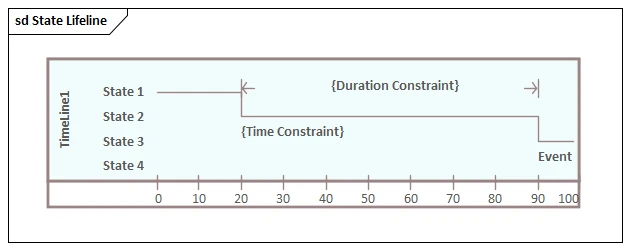
| Timing Diagram |
|
Emphasizes timing constraints and changes in state or condition along a time axis, useful for real-time systems. |
These distinctions help teams visualize, design, and document complex software systems more effectively.
Given below is a quick reference on the difference between UML Structural and Behavioral diagrams.
| Aspect | Structural UML Diagrams | Behavioral UML Diagrams |
|---|---|---|
| Purpose | Model static structure and relationships | Model dynamic behavior and interactions |
| Focus | Classes, objects, components, architecture | Workflows, interactions, state changes |
| Representation | System parts and their connections | System processes, events, and flows |
| Time Aspect | No time element; static snapshot | Includes time, events, and changes |
Explore how our Tailored Solutions support digital transformation, compliance, and model-driven development across industries, Learn about Sparx EA Solutions!
The Sparx Systems Enterprise Architect supports all 14 diagram types, enabling precise modeling across the full system lifecycle.
Sparx EA offers tailored toolbox with all the relevant elements and connectors to speed up modeling.
Model Builders, Auto-Layout features and drag & drop capabilities make modeling with EA fast and intuitive.
Real-time Collaboration tools, Version Control integration, Shared Repositories in Enterprise Architect help teams to work together effectively.
Code Generation, Database Schemas, Documentation and Reporting and more—directly from your Sparx EA UML Models.
Submit Your Request and We’ll Promptly Send a Payment link or Invoice.