
Every large organization runs hundreds of software applications. Some power critical customer journeys, others handle back-office processes, and many sit hidden in spreadsheets or shadow IT. Without oversight, these tools multiply, creating a tangled mess of technical debt, budget overruns, and serious security gaps.
This is where Application Portfolio Management (APM) comes in. Think of it as a formal strategy for getting that chaos under control. It’s the process of cataloguing every application, honestly assessing its business value and technical health, and then making smart, informed decisions: what to keep, what to modernize, and what to retire.
In this guide, we’ll break down what APM is, why it’s more important than ever, and how you can start an APM program that actually delivers measurable value. We’ll also show how tools like the Sparx Systems Enterprise Architect Platform and Prolaborate dashboards can support your efforts.
Need a jumpstart for your APM practices?
Get hands-on expert guidance from Sparx Systems North America tailored for your portfolio
APM Explained in One Minute
Fundamentally, APM is all about visibility and governance. You can’t manage what you can’t see.
It starts with a simple, comprehensive inventory of all your software. You capture the basics: its purpose, who owns it, what it costs, and the technology it runs on. Then comes the evaluation. Each application is assessed against key criteria: How important is it to the business? What’s its risk profile? Is it even being used? How healthy is the underlying tech?
Finally, you act. You use those insights to make decisions. Redundant tools get eliminated. Obsolete platforms are replaced. Key systems are flagged for modernization or migration.
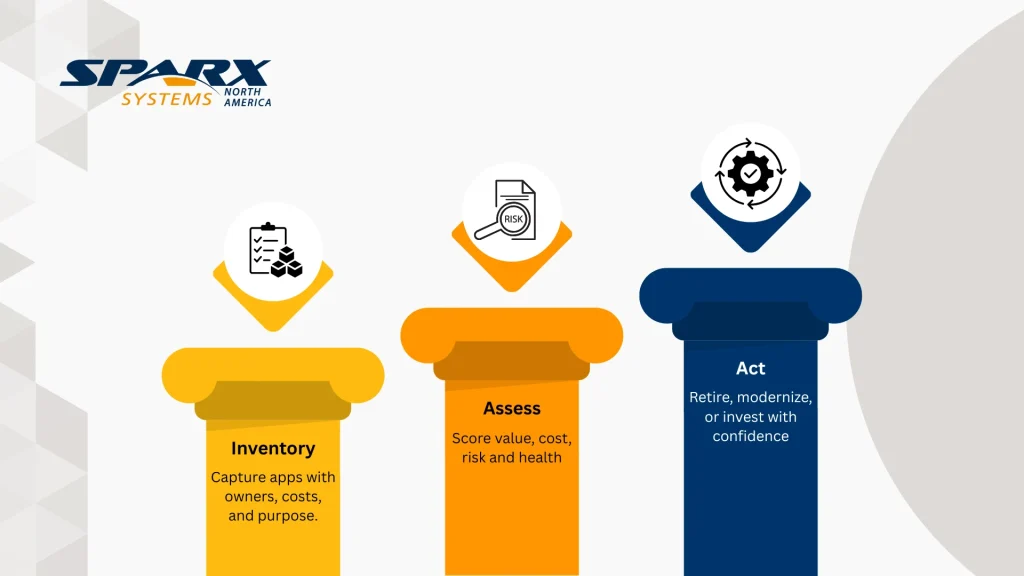
This isn’t a one-and-done project; it’s a continuous cycle that keeps your application landscape from drifting away from business goals. And this is why APM is so much more than just software asset tracking. Asset tracking counts licenses. APM focuses on strategic outcomes, like cutting costs, reducing risk, and making the company more agile. A good APM program combines process, data, and tools to create a single source of truth that everyone from executives to architects can trust for decision-making.
Why APM Matters Now: Costs, Risks, and Agility
The need for APM is genuinely urgent right now. Why? Because the massive growth of Cloud and SaaS applications has made it incredibly easy to lose track of costs, risks, and even basic ownership.

Application Portfolio Management restores that single, shared view. It allows leaders to cut waste, reduce risk, and move faster by tackling four key pressures everyone is feeling: :
Cost pressure
Licensing, maintenance, and infrastructure costs just keep climbing. Research studies consistently show that companies without a clear view of their software are overspending, often by 25% or more, on redundant or simply unused applications.
Risk and compliance
Every outdated piece of software or forgotten “shadow IT” project is a potential security vulnerability or a failed audit waiting to happen. Regulations like GDPR demand that you know exactly where your data is and who controls it.
Digital transformation
Everyone is trying to migrate to the cloud, adopt agile methods, or modernize legacy systems. A messy portfolio grinds these projects to a halt. You can’t move forward when dependencies are a mystery and all your resources are being eaten by technical debt.
Business agility
When the market changes or a new product needs to launch, IT has to respond fast. A lean, well-managed portfolio means you can integrate systems or launch new capabilities in a fraction of the time it would otherwise take.
By tackling these pressures, APM frees up budget, slashes risk and builds a stable foundation for innovation. This is where tools like Sparx Systems Enterprise Architect come in, providing a central hub to model applications, their costs, and their relationships. Dashb
How APM Works: Inventory → Assessment → Rationalization (APM Lifecycle)
So, how does APM turn a simple inventory into clear decisions? It works as a repeatable lifecycle, often run quarterly, that ensures you’re always improving.

A solid APM practice breaks down into five key steps:
1. Inventory and classification
First, you collect a “minimum viable” set of data (name, owner, cost, business capability, technology) for each application. Then, you classify them: What business domain do they live in? How critical are they? In APM modeling tools like Enterprise Architect, you can store this as element properties or tagged values.
2. Assessment and scoring
This is where you evaluate each application. You’ll look at its business value, technical health, cost, and risk. You can even assign weights to each area to reflect your company’s main priorities. This process quickly flags low-value, high-cost apps as candidates for retirement.
3. Prioritization and Rationalization
Based on those scores, you decide what to do. The TIME model (Tolerate, Invest, Migrate, Eliminate) is a great framework for these choices. You might decide to retain, retire, rehost, replatform, refactor, or repurchase an application. Using bubble charts here to map value against cost is a great way to spot the quick wins.
4. Governance and cadence
This isn’t a “set it and forget it” process. You need regular review cycles to keep the data current and ensure decisions are actually implemented. Quarterly governance boards are perfect for reviewing new applications, updating scores, and approving retirement plans. Documenting these decisions in Prolaborate is crucial for accountability.
5. Continuous improvement
As your organization gets better at this, you can refine your scoring model, integrate with CMDBs and finance systems, and automate data collection. You use what you’ve learned to improve the whole process.
It’s this complete cycle that makes APM work. The inventory makes the assessment possible. The assessment drives smart decisions. And those decisions lead to a cleaner, updated inventory. Over time, your portfolio gets leaner, you chip away at technical debt, and you free up resources for the projects that really matter like innovation.
APM vs Related Practices (ITAM, Performance Monitoring, PPM, EA)
APM doesn’t live in a vacuum. It’s helpful to see how APM differs from—but also works with other common IT practices:
Application performance management – This is about monitoring the runtime health, availability, and responsiveness of live applications. It answers tactical questions like, “Is the website up?” or “Are response times slow?” Our brand of APM looks at the entire lifecycle, including business alignment and cost, not just runtime metrics.
IT asset management – ITAM tracks software licenses and hardware to ensure compliance and get the best purchasing deals. APM uses that cost data but asks a more strategic question: “Should we even have this application at all?”
Project and product portfolio management – PPM manages new projects and investments—the “change” side of the business. APM focuses on the “run” side, making sure the applications you already have are fit for purpose. PPM governs the change pipeline; APM governs the operational landscape.
Enterprise architecture – EA provides the master blueprint for the organization’s processes, data, and technology. APM is a key part of that blueprint, providing specific governance for the application layer. In fact, enterprise architects often lead APM efforts because they are in the perfect position to map applications to business capabilities.
These disciplines all complement each other. For example, a performance monitoring tool might flag an issue that triggers an APM review. Asset management data feeds into your cost assessments. And your project portfolio depends on an accurate application inventory to avoid building duplicate functionality. The Sparx toolset integrates these views: Enterprise Architect models the enterprise, Pro Cloud Server enables collaboration, and Prolaborate provides dashboards for different stakeholders.
What Good APM Looks Like Dashboards and Decision Views
So, what’s the payoff? When APM is working well, anyone from the CFO to a product owner can get answers to tough questions in seconds. The data is current, trusted, and most importantly, visualized for decision-making.
Here are a few views you should be able to see, all of which are possible using Prolaborate on top of an Enterprise Architect repository.
Portfolio Roadmaps for Sequencing and Budgeting
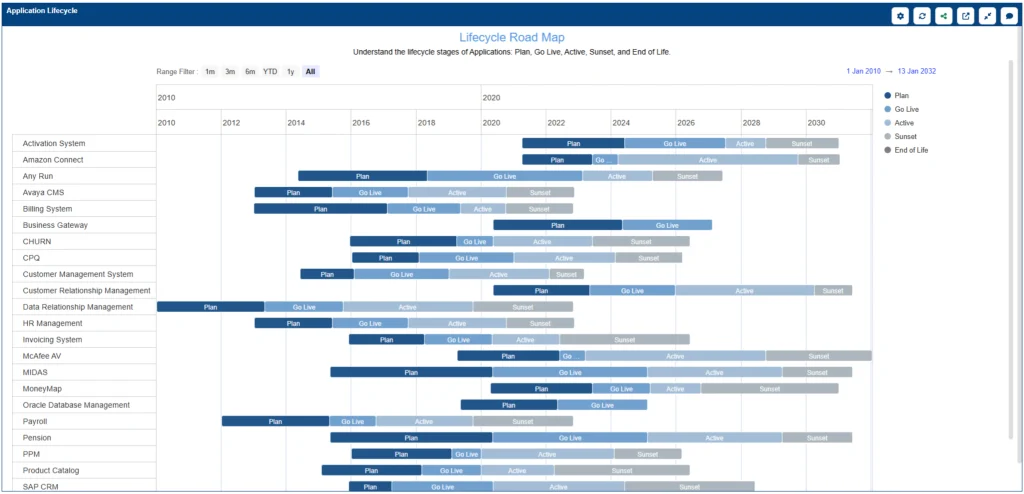
- Timed decisions: A portfolio roadmap or Gantt chart, grouped by business capability, showing planned actions (like ‘Retire’ or ‘Migrate’) by quarter.
- Dependencies: Inline markers for integrations, so you can sequence changes without breaking something upstream.
- Budget alignment: Overlay cost and benefit estimates to support annual planning and track whether your changes are delivering the promised value.
- Roadmap setup: Drive the view from EA elements with properties like strategyAction, targetDate, timeHorizon and relationships to target platforms.
Capability‑to‑Application Mapping to Find Redundancy and Risk

- Capability Analysis: Imagine a map of your business capabilities (like “Process Payments” or “Manage Inventory”), colored by application risk level or lifecycle status.
- Redundancy spotlight: This view immediately shows you where you have five different apps all doing the same low-value task—a perfect rationalization target. It also flags high-risk areas where one critical, unhealthy app is running the show.
- Prolaborate setup: Maintain realizes relationships from applications to capabilities, and expose roll‑up KPIs (cost, risk, health) at the capability level.
Heatmaps That Show Cost Vs. Value and Risk Vs. Health

- Cost vs Value: A classic matrix view with business value on one axis and total cost on the other. Bubble size can show how many people use it. This instantly lights up your “quick wins” (low value, high cost) for retirement and your “strategic bets” (high value, high cost) for investment.
- Risk vs Health: Plot your risk exposure (security, compliance) against the actual technical health (support status, defects). This flags urgent problems and builds your modernization queue for you.
- Heatmap setup: Use application properties or tagged values like businessValue, annualCost, techHealth, riskScore. Configure color thresholds (e.g., 0–3 red, 4–7 amber, 8–10 green) and publish saved perspectives for Finance, Risk and Product.
Getting Started with APM (and Common Pitfalls)
Starting an APM program doesn’t have to be a massive, multi-year transformation. The best approach is to start small, prove the value, and expand over time. Focus on a single, high-impact business area and try a 30-60-90 day plan:
- Define scope and success criteria – Choose a department or capability. Agree on what “success” means (e.g., “cut costs by 10%” or “eliminate all high-risk apps”). Appoint a portfolio owner and get an executive sponsor who can help drive adoption.
- Bootstrap the inventory – Use spreadsheets to collect the basic data. Don’t wait for perfection; just start with what you have and iterate. You can import this data into APM tools like Enterprise Architect and enrich it with relationships later.
- Create simple dashboards – Configure those first cost-vs-value and risk charts. Share these with stakeholders to get the conversation started and prioritize some quick wins.
- Run an assessment workshop – Gather business owners, architects, and finance reps to review the inventory. Your goal is to identify redundant apps, obvious retirements, and critical gaps. Document every decision and action item.
- Plan the next phase – Use the feedback from the workshop to expand your scope, refine your scoring criteria, and establish a regular cadence for governance meetings.
A few common pitfalls to avoid when implementing APM: Don’t over-engineer your data model from day one. Start simple. Make sure every single application has a clear owner. And don’t let the data get stale; this is the fastest way to lose trust. Use automation where possible to pull data from systems you already have. Most importantly, keep talking to your stakeholders and show them the progress through real savings and risk reduction.
See For Yourself
Get a live demonstration of Sparx Systems Architecture Platforms: Essential frameworks, dashboards, and portfolio roadmaps powered by Sparx EA & Prolaborate
Ultimately, application portfolio management provides a strategic, common-sense lens for viewing one of your most complex assets: your software. By making the entire application landscape visible, measurable, and governable, APM gives teams the power to cut costs, reduce risk, and finally accelerate change. It’s a disciplined cycle with inventory, assess, rationalize, and governance that builds a culture of continuous improvement.
Understanding how APM fits with your other IT practices clarifies roles and helps everyone work together more effectively.
Getting started is less daunting than it looks. The key is to begin small, stay focused on delivering real value, and use collaborative tools like Sparx Systems Enterprise Architect and Prolaborate to visualize the data and share your insights. As you get better at APM, your portfolio will naturally become leaner and more aligned with the business strategy. You’ll stop wasting money on redundant tech and start freeing up resources for real innovation.


