
Think of Enterprise Architecture (EA) as the master blueprint for your organization—it shows how all the moving parts, from business processes to data and technology, are designed to work together. Application Portfolio Management (APM) fits right into this picture, focusing specifically on the software applications and how they support the business.
These two disciplines depend on each other. Without the context of Enterprise Architecture, APM can easily become a simple inventory checklist which is one of the key APM implementation challenges where effort outweighs value. But without the practical details from APM, EA models lack the real-world data needed to make smart decisions about costs and risks.
This article explores why APM is a crucial part of Enterprise Architecture, how mapping business capabilities and technical dependencies gives you richer insights, and how you can effectively present those insights to leadership using modern EA modeling and data visualization platforms such as Sparx Enterprise Architect and Prolaborate.
Get a tailored operating model, governance cadence, and dashboards aligned to your portfolio.
Why Enterprise Architecture Underpins Application Portfolio Management (APM)
At its core, Enterprise Architecture is designed to cut through complexity. It helps align IT projects with the company’s main strategy and builds in the flexibility needed for future changes. It does this by creating clear models that show the relationships between business functions, information, applications, and the underlying technology.
Application Portfolio Management uses this structured view to get clear answers to critical questions about the company’s software:
Contextualizing applications
By placing an application within the business architecture, EA pinpoints what each system actually does and how (or if) it contributes to creating value.
Revealing redundancies and gaps
Capability maps and process models quickly uncover where you have multiple applications doing the same job, or more importantly, where a critical business function has no system support at all.
Assessing change impact
When you understand the upstream and downstream connections, you can accurately predict the ripple effect of retiring, replacing, or updating any single application.
Guiding investment
This alignment makes sure that any decision to invest in a new tool or cut back on an old one directly supports the organization’s strategic goals.
In short, EA provides the essential scaffolding that makes APM analysis meaningful. It directly addresses common data collection issues by providing a clear structure for what information to gather and where it fits. Without it, you’re just making portfolio decisions in a vacuum.
Mapping Capabilities to Applications
A core component of EA-driven APM is capability mapping. This is the practical work of linking each business capability think “Customer Onboarding” or “Billing” to the specific applications that support it. The benefits become obvious very quickly:
- Clarity on coverage: This process quickly shows leaders which capabilities are well-supported and which might be relying on a single, high-risk application.
- Value-based discussions: This shifts the conversation away from technical jargon and feature debates. Instead, stakeholders can discuss how well the technology stack is enabling the business capabilities that matter most.
- Prioritization of investments: When budgets are tight, you can clearly see which capabilities give you a competitive edge or are required for compliance, allowing you to prioritize modernization efforts effectively.
- Simplified communication: Capability maps are visual and easy for non-technical audiences to grasp, making them perfect for executive briefings.
In Enterprise Architect, you can model your business capabilities, link them to your application components, and visualize these relationships. Prolaborate can then publish this information as interactive dashboards that show the health, cost, and risk for each capability, making it clear where to invest or divest.
Modelling Dependencies and Technology Stacks

Applications rarely exist in isolation. They’re constantly talking to each other through interfaces, sharing data, and running on common infrastructure. Sparx Enterprise Architect (EA) helps teams map out these complex dependencies by:
1. Interface diagrams
Visualizing data flows and service calls between applications helps you identify critical integration points. This information is good when you’re planning a major migration or rationalization project.
2. Technology stacks
Documenting the underlying technologies like frameworks, databases and operating systems reveals where different applications share the same platforms. Consolidating these common stacks can massively simplify maintenance and reduce licensing costs.
3. Layered views
Organizing components into logical layers (like presentation, business logic, and data) helps architects spot unnecessary coupling and complexity.
4. Impact analysis
When a change is proposed, these dependency maps allow teams to trace the potential ripple effects across the entire portfolio.
Recording this information in Enterprise Architect connects your portfolio data to the wider technology architecture. When you combine this with APM scoring (e.g., for business value vs. technical risk), your dependency models give you a solid, data-backed foundation for deciding which systems to retire, invest in, or maintain.
Portfolio Roadmaps and Impact Analysis
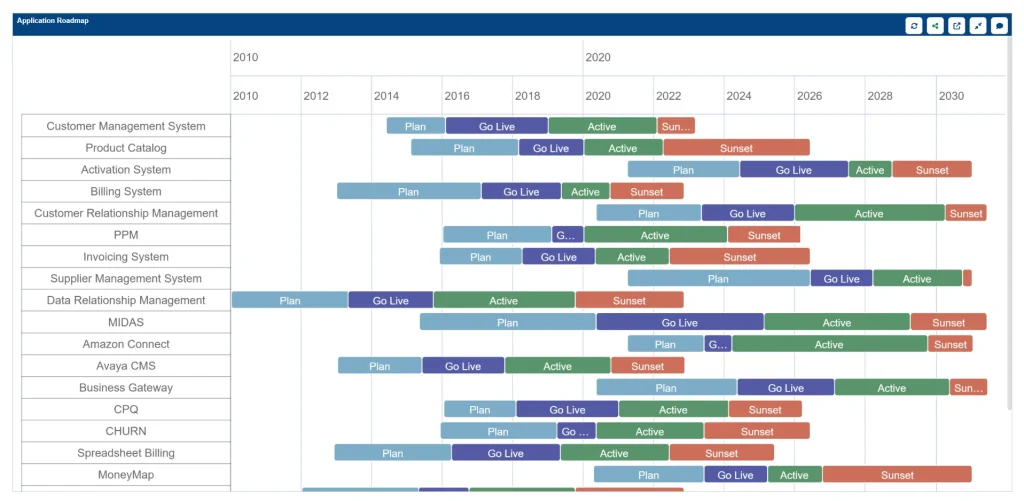
Application rationalization and modernization aren’t one-time events; they are ongoing processes that have to be coordinated with dozens of other initiatives. This is where effective change management in APM becomes critical. Using Sparx EA, you can build portfolio roadmaps that organize timing, dependencies, and stakeholder needs into a clear, logical sequence.
This approach helps you manage:
- Timeline alignment: Roadmaps clearly plot when specific applications will be retired, replaced, or upgraded. You can align these timelines with new product releases, fiscal cycles, or regulatory deadlines to minimize business disruption.
- Scenario planning: Architects can model different “what-if” scenarios. For example, what’s the full impact of adopting a new cloud platform versus consolidating three legacy systems? You can evaluate the impact on capabilities, costs, and risks for each option.
- Dependency sequencing: The roadmaps ensure you’re tackling things in the right order. Prerequisite systems (like a central identity platform) are addressed before the downstream applications that rely on them.
- Stakeholder communication: A visual roadmap gives everyone—business leaders, project managers, and technical teams—a single, shared plan they can understand and commit to.
Enterprise Architect’s project management and diagramming tools make this roadmap creation easier, and Prolaborate can publish them to all stakeholders. By linking these roadmaps to your APM scores, you ensure that every step remains driven by data, not just assumptions.
Communicating APM Insights to Leadership

One of the most frequently overlooked parts of APM is presenting your findings to non-technical leaders in a way that actually inspires them to act. A 50-page report of raw data won’t do it; in fact, it often increases resistance to APM because the value isn’t clear. Prolaborate is designed to bridge this exact gap by turning your detailed Sparx EA models into clean, accessible, and interactive dashboards.
This is what makes the difference:
- Role-based portals: You give people the information they need, and nothing they don’t. Executives might see a high-level capability map with simple red-yellow-green status indicators. A risk officer could see a compliance heatmap, while a project manager sees the roadmap with key milestones.
- Interactive drill-down: It’s not a static report. Users can click on a capability to see the applications behind it, their associated costs, and any planned changes. This immediate context sparks much more informed discussions.
- Real-time data: Because Prolaborate is connected directly to the Enterprise Architect repository, your dashboards are always live. As architects update the models, the dashboards refresh automatically. This completely eliminates the need for manual report-pulling every quarter.
- Collaboration features: Stakeholders can use commenting and feedback tools directly within the dashboard. This closes the loop between analysis and decision-making, as questions can be asked and answered right on the relevant chart or diagram.
By providing these tailored views, Prolaborate makes the entire process transparent and helps executives see the direct impact of APM efforts on the company’s strategic goals.
Witness Sparx Systems’ APM Capabilities in Action. Get a customized walkthrough, tailored for your needs.
Ultimately, Enterprise Architecture and Application Portfolio Management are two sides of the same coin. They are complementary disciplines that, when combined, create a powerful framework for aligning your technology with your business strategy and navigating common APM implementation challenges.
Enterprise Architecture provides the all-important structural context—your capabilities, processes, and technologies. APM brings the detailed, actionable insights about your application costs, risks, and health.
By using Sparx Systems Enterprise Architect to model the enterprise and Prolaborate to communicate these insights, your organization can move from guesswork to making informed, data-driven decisions that truly optimize your application landscape for the future.


