
Many organizations find themselves managing a sprawling collection of applications, often built up over decades. The challenge isn’t just keeping them all running; it’s understanding which ones are genuinely driving the business forward and which are just taking up resources. Application Portfolio Management (APM) provides a practical framework for getting answers. It’s the process of cataloging your apps, assessing their true value and risk, and making clear-eyed decisions about their future. This article breaks down the core components of APM and how they fit together in a simple, continuous cycle.
A successful APM program depends on a few key activities: building an inventory, scoring apps on their value and risk, ranking your options, planning the roadmap, and holding regular reviews. These activities are the essential components of APM, and this guide will show you how to get them running in weeks, not quarters.

Explore how Sparx Systems Architecture Platform supports inventory capture, scoring, heatmaps, and portfolio roadmaps—all inside Enterprise Architect and Pro Cloud Server.
The APM Lifecycle at a Glance
Think of APM not as a one-time project, but as a continuous APM lifecycle. It should fit right into your regular planning rhythm. The goal is to turn that big list of apps and scores into concrete actions, a clear roadmap, and a simple way to manage it all.
This cycle consists of several key APM process steps:
- Discover & Inventory – First, just find everything. Refresh your application list by pulling data from your CMDBs, code repositories, and even finance systems (to see what you’re paying for).
- Classify & Map – Once you have the list, start the application classification process by grouping the apps. Which business capability does this serve? How critical is it? You also need to map its most important dependencies.
- Assess – This is where you score each app. Look at its business value, its risks, its technical health, and how much it’s being used. This gives you a fair baseline for everyone to work from.
- Prioritize – With scores in hand, you can rank your applications. This isn’t about guesswork; it’s about using clear rules to spot the quick wins and the urgent problems.
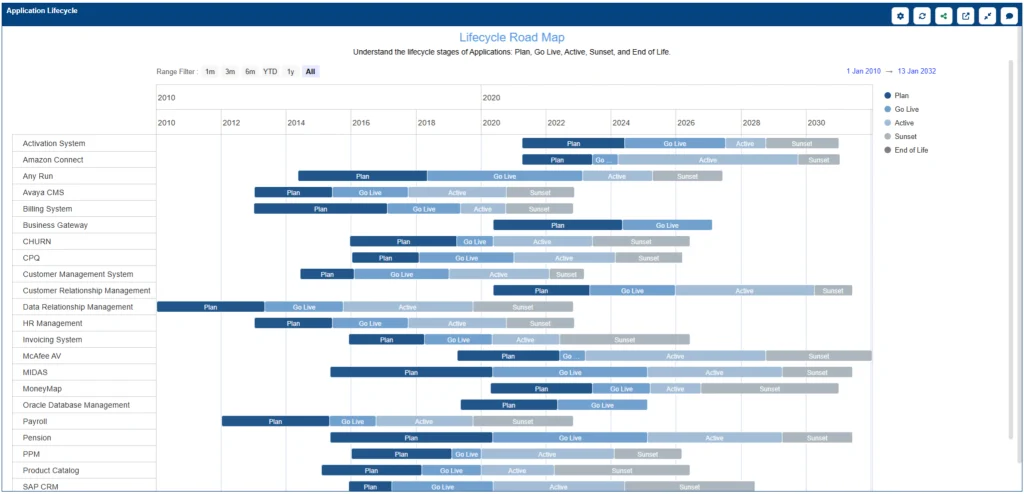
- Rationalize – Now it’s time to decide. For each app, you’ll choose an action (like Tolerate, Invest, Migrate, or Eliminate) and build these decisions into application lifecycle roadmaps that track change and technical debt over time.
- Govern – Finally, you track your progress. Use dashboards to see how the plan is unfolding and be ready to make adjustments as new information comes in.
You can (and should) model this entire APM lifecycle, maybe with BPMN or ArchiMate. The point is to link each of the APM process steps to real data. By running collaborative reviews, you create a transparent process that anyone can check on and that you can easily update.
Build a Reliable Application Inventory
Your entire APM effort is built on your application inventory, and it’s arguably the most critical of all the components of APM. If the data is bad, the decisions will be too. The most important rule? Only track the information your teams can realistically keep up-to-date. It’s better to have 10 accurate fields defined in a practical APM field dictionary than to aim for a perfect, 200-field database that becomes obsolete in a month because no one can maintain it.

Start with the essentials. Insist on clear definitions and make sure every application has a named owner.
- Identity: Name, description, aliases, lifecycle status (proposed/active/sunset), version.
- Ownership: Business owner, technical owner, product owner, support group.
- Business Context: Supported capability or process, customer group, regulatory scope.
- Technical Context: Tech stack, hosting (on‑prem, IaaS, PaaS, SaaS), key interfaces.
- Risk & Compliance: Data classification (PII/PCI/HIPAA), vendor criticality, DR tier.
- Cost & Usage: Annual cost, license model, user counts, utilization trend.
When it comes to application classification, use simple, clear categories that everyone understands, like strategic, core, supporting, or commodity. (Inside Sparx EA, you can set these up as enumerations in a Profile/MDG to ensure everyone labels apps the same way). The real power comes when you link these apps to your business capabilities, data, and technologies. That “graph” you’re building is what makes your future assessments and roadmaps truly insightful.
Classify Applications and Map Dependencies Based on Assessment Criteria
An inventory is just a list. The assessment phase, another key component of APM, is what turns that list into a powerful tool for decision-making. This involves scoring each application against simple, plain-language criteria. Use a consistent scale (like 0–5 or 0–100) to create that all-important baseline everyone can trust.
- Business Value: Does it drive revenue, meet regulation, or delight customers? How well does it align to strategy?
- Risk: What could go wrong—sensitive data, vendor lock‑in, obsolete tech, incident history?
- Technical Health: Code and architecture quality, supportability, patch level, test coverage.
- Usage & Cost: Active users, volume, and unit cost trends.

To make sure these scores are trustworthy and not just opinions:
- Be transparent. Publish the scoring weights (e.g., Value is 40%, Risk is 25%, etc.).
- Back it up. Link actual evidence (incident reports, audit findings, cost center data) to each score.
- Track changes. Take quarterly “snapshots” of your assessments to see how the portfolio’s health is changing over time.
Prioritize the Portfolio with Transparent Scoring
Once you have your assessment scores, you need to decide which applications get your attention first. This shouldn’t be a political battle. By using structured scoring and ranking, you can turn all that APM data into fair, transparent, and consistent decisions based on models that everyone can understand.
- Weighted Scoring: Sum the criteria into a single score and rank the list.
- Thresholds & Gates: Set minimum bars (e.g., Health < 40 requires a remediation plan).
- Quadrants & Heatmaps: Plot Value × Health or Value × Risk for quick trade‑offs.
- What‑If Scenarios: Change weights to reflect a cost‑out or growth push and compare results.
The key is to make this process fair and repeatable:
- Write it down. Document your formulas, weights, and data sources in your APM playbook so no one has to guess.
- Separate facts from feelings. Keep the facts (the scores) separate from the choices (the weights you apply). This allows leadership to steer strategy by adjusting the weights (e.g., “this quarter, we’re focusing on cost-cutting”).
- Don’t change the rules constantly. Keep your model steady for a reasonable period, then fine-tune it based on the actual results.
Rationalization Using the Gartner TIME Model (Tolerate, Invest, Migrate, Eliminate)
Rationalization is where the planning turns into action. This step, which follows prioritization, is one of the final APM process steps. The best approach is to use a small, clear set of decisions for every app. The Gartner TIME model (Tolerate, Invest, Migrate, Eliminate) is popular for a reason—it’s simple and it works. The key is to tie every single decision to actual work on your roadmap.

- Tolerate – Keep it running as-is. Just basic maintenance.
- Invest – This app is a winner. Enhance or modernize it to get more value.
- Migrate – Move it. Get it onto a target platform or merge it with another app to cut application costs and reduce risk.
- Eliminate – It’s time to say goodbye. Decommission the app safely, archive its data, and terminate the contracts.
To keep your APM lifecycle moving, run a simple governance rhythm:
- Quarterly: Hold a portfolio review. This is the time to adjust scoring weights and approve big changes to the roadmap.
- Monthly: Check on exceptions (new incidents, new risks) and track the benefits you’re realizing from your decisions.
- Weekly: Focus on data hygiene. Is the inventory up to date? Is the pipeline of work moving?
Finally, make it official. Define the roles (like Portfolio Owner, Domain Architect, etc.), agree on a RACI, and link your APM process directly to your standard change management. By capturing all this as a metamodel (connecting applications, capabilities, and owners), you create a clear line of sight from every roadmap item all the way back to the evidence that justified it.

Work with our consultants to stand up your APM lifecycle, tailor scoring models, and build dashboards that drive decisions. We can accelerate outcomes and coach your team.
Ultimately, Application Portfolio Management (APM) is about making sure what you run aligns with why you’re in business. By standardizing the key components of APM like inventory, assessment, prioritization, and governance, you get a reliable, repeatable APM process for steering your investments wisely. Sparx Systems Enterprise Architect provides the modeling backbone and collaboration tools to bring all this to life, connecting your catalogs, scores, and roadmaps to a fully traceable metamodel.
The best advice? Start small. Keep your review cycle predictable. And let your evidence, not just opinions, drive your portfolio decisions.


