
In the modern enterprise, the application portfolio is the business. It represents decades of investment and innovation, but it also harbors hidden complexity, cost, and risk. For CIOs, IT leaders, and enterprise architects, the critical challenge is no longer just cataloging this sprawling digital estate, but strategically managing it to drive business value.
Are your applications helping you win, or are they a high-cost, high-risk liability holding you back?
This question is the reason why APM is becoming critical for modern enterprises. Answering it requires data-driven decisions about cost, risk, and business alignment. And for too long, the very tools we’ve used to find these answers have been failing us.
Get a guided walkthrough of Enterprise Architect + Prolaborate dashboards, and visualization use cases tailored to your application portfolio and priorities.
Why Spreadsheets and Wikis Fail for Modern APM (The Core Problem)
Every mature organization has an application “inventory,” and it almost always begins as a spreadsheet or a wiki page. This is a necessary first step, but it is a disastrous final one.
As a portfolio grows from 50 applications to 500 or 5,000, the static-file model collapses.
- They Are Instantly Stale: The data is a snapshot. The moment an application is updated, a server is patched, or a business owner changes, your “master” spreadsheet is wrong. This erodes trust and leads to decisions based on flawed, outdated information.
- They Are Scattered: Spreadsheets create scattered documentation, leaving architects without a unified view of application relationships. This breaks end-to-end traceability and impact analysis, so you can’t see that cutting one “low-value” app will break three “high-value” processes.
- They Are Opaque: You can’t create dynamic, role-based views. A CIO needs a high-level dashboard of cost vs. value. A security officer needs a list of apps with high-risk vulnerabilities. A solution architect needs to see the technology stack. The spreadsheet is one-size-fits-all, which means it fits no one.
- They Have Zero Governance: When the “single source of truth” is an attachment in an email, you have no truth. There is no controlled workflow for application rationalization, no audit trail for changes, and no way to enforce a consistent APM framework.
This is why robust APM governance is impossible with static files. You are making high-stakes financial and strategic decisions in a data vacuum. This failure demands a new approach, the one that shifts from a simple inventory to a living model.
To understand the dept of this difference, check out why Sparx Systems Enterprise Architect is best suited for application portfolio management (APM).
What is APM in the Context of Sparx Enterprise Architect?
This is where Application Portfolio Management with Sparx EA fundamentally changes the conversation. In the context of Sparx Enterprise Architect, APM is not a static list; it’s a living, interconnected model that is integrated into enterprise architecture, allowing application data to be directly connected to capabilities, processes, technology platforms, and strategic initiatives.
This application portfolio modeling approach transforms APM from a clerical inventory task into a strategic, architectural discipline. An application is no longer just a row in a spreadsheet; it’s a rich, repository-based object that you can visually and programmatically connect to the entire enterprise ecosystem:
- Business Capabilities it supports.
- Business Processes it automates.
- Data Objects it creates, reads, or updates.
- Technology Stacks it runs on (servers, databases, middleware).
- Projects that are changing it.
- Stakeholders who own it.
Now, complex “what-if” analysis becomes trivial. “If we decommission this server, which business processes and capabilities are impacted?” “What is the total cost of all applications supporting the ‘Claims Processing’ capability?”
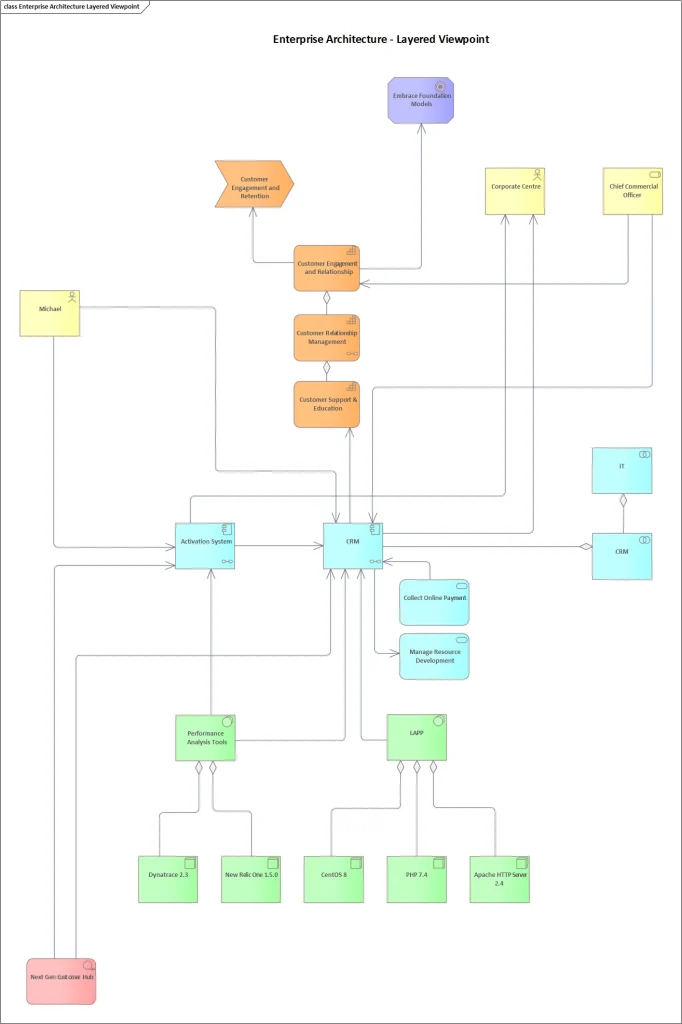
While a spreadsheet might summarize metadata with pivot tables, it completely fails at this crucial impact analysis. It cannot answer those ‘what-if’ questions. If an application is scheduled for retirement, a flat file can’t show which capabilities and dependent components are affected, or which replacement application will take its place.
A model in Sparx Systems Enterprise Architect, however, is built to answer exactly these questions. The Sparx EA + Prolaborate Solution: A Two-Part Strategy.
Building a rich, technical model in Sparx EA is the essential first half of the solution. But it creates a new, predictable challenge: the model is powerful, but it’s not accessible to non-technical decision-makers.
Your CIO, your head of finance, and your business unit managers need strategic insights, not the raw, granular details of technical Sparx EA models. Bridging this gap between complex technical data and clear executive insight is the core challenge the Sparx APM solution solves, using a perfect two-part strategy that leverages the right tool for the right job.
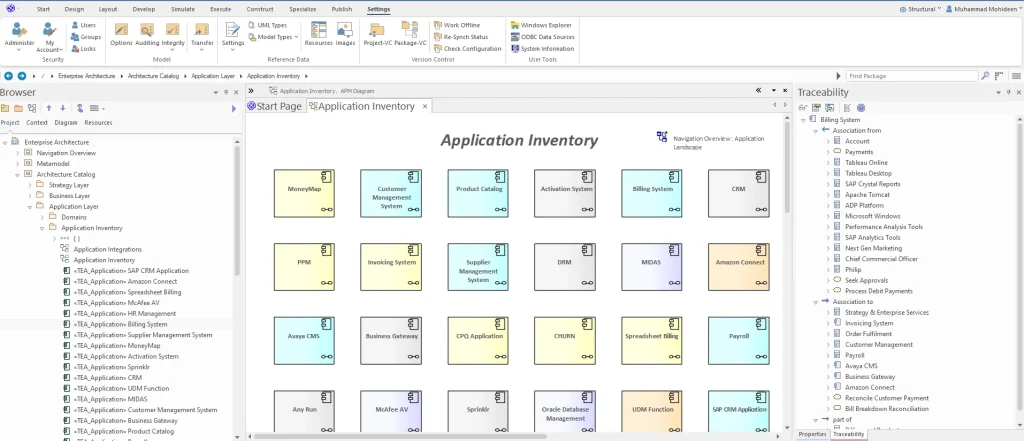
Sparx EA: Your APM Single Source of Truth
Sparx Enterprise Architect for APM serves as the foundational repository. This is the technical platform where architects and modelers build the rich, interconnected APM database. It is the undisputed single source of truth where the complex data relationships are forged, managed, and secured.
Prolaborate: Your APM Stakeholder & Decision Portal
Prolaborate is the business-friendly access layer. It’s the web-based dashboard and portal that sits live on top of your EA repository. It provides interactive, curated, and personalized views of the APM data for every decision-maker. It presents this complex data in a simple, relevant, and actionable format.
This combination is the key: a robust, architect-driven repository to ensure data integrity, and a simple, web-based portal to ensure business engagement.
How to Build Your Application Inventory in Sparx EA
The journey begins by building that foundation in Sparx Enterprise Architect. This is a methodical process of evolving a simple list into a robust, scored Application Catalog.
First, you define your APM Metamodel. This is your organization’s unique “data dictionary,” implemented using EA’s Stereotypes and Tagged Values to capture key metrics for every app: ApplicationOwner, TCO, TechnicalFit, FunctionalFit, LifecycleStatus, and more.
Next, you Build Your Application Catalog. You don’t have to start from scratch. Use Sparx EA’s CSV import to baseline your existing (and messy) spreadsheets, populating your Application Catalog in hours, not months.
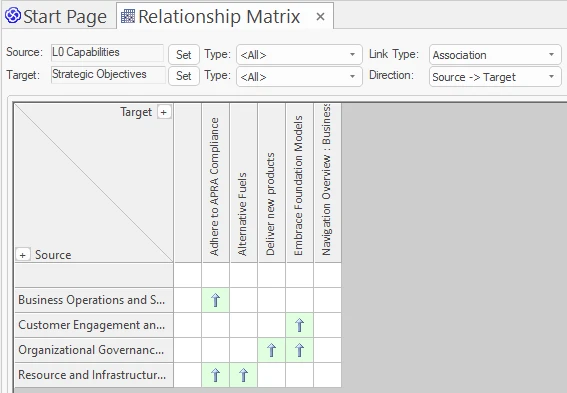
Then, you establish Traceability. This is the high-value work of architecture. You create Relationships between your application components and your business capability models, server diagrams, and data models. This enriches the inventory with the context spreadsheets could never provide and powers EA’s Relationship Matrix for impact analysis.
Assess & Score Your Portfolio: Cost, Risk, and Business Value
With the inventory connected, you can mature to a true portfolio. An inventory is what you have; a portfolio is how you value what you have.
Using the Tagged Values you defined, you work with business stakeholders to score each application on a simple 1-5 scale for key metrics:
- Business Value: How critical is this app for making money or serving customers?
- Technical Fit: Is this built on a modern, supportable, secure stack?
- Operational Risk: What’s the impact if this application goes down for an hour?
- Total Cost of Ownership (TCO): Include licenses, support, and infrastructure.

This assessment data is what powers all application rationalization. You can now use this data to make objective, data-driven decisions based on the classic TIME model:
- Tolerate: (High value, good tech) – It’s fine, leave it.
- Invest: (High value, bad tech) – Worth investing to modernize or replace.
- Migrate: (Low value, good tech) – Can we move this function to a better app?
- Eliminate: (Low value, bad tech) – Why do we still own this? Decommission it.
Creating APM Stakeholder Views in Prolaborate
Your model is now built, assessed, and scored in EA. The final and most crucial step is to make this value visible to the people who make decisions. This is where Prolaborate APM dashboards complete the story.
You configure live dashboards that translate the complex model into simple, actionable business intelligence:
- For the CIO: A high-level dashboard showing a “Cost vs. Business Value” bubble chart. They can instantly see which apps are “Key Performers” (high value, low cost) and which are “Rationalization Targets” (low value, high cost).
- For the Security Officer: A simple, filterable list of all applications tagged with HighSecurityRisk or those that store PIIData.
- For the Business Owner: A curated portal where they see only their applications. Prolaborate’s unique review and update features can even let them update information (like BusinessCriticality), with all changes written back to the EA repository under a controlled governance workflow.
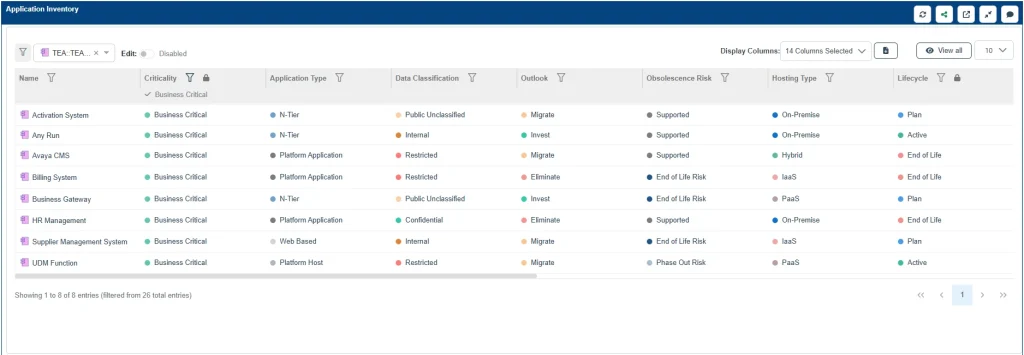
This democratizes data, closes the loop on APM governance, and finally aligns business and IT around a single, shared, and trusted set of data. For a detailed guide on visualization, see Building APM Stakeholder Views in Prolaborate from Sparx EA Models.
Cut Months of Setup into Days—Start with Proven Sparx Application Portfolio Management Templates
Get Started with APM in Sparx EA (Your First 5 Steps)
This entire journey can feel overwhelming. The key is to start small and show value quickly. To simplify it, you can follow these 5 steps to take control of Application Portfolio with Sparx Architecture Platform.
- Define Your #1 Goal: Focus on a single, primary objective. Is your first priority cost saving? Or risk reduction? Pick one.
- Define Your “Minimum Viable Metamodel”: What are the 5-10 “must-have” properties (Tagged Values) you need to track? Start with just those.
- Pilot One Business Unit: Don’t try to model all 1,000 apps. Pick one business area. Model their 30-50 applications.
- Build One Dashboard: Connect Prolaborate immediately. Build one dashboard for the sponsor of your pilot that answers their single most pressing question.
- Showcase and Iterate: Take that one dashboard to other business leaders. Show them what’s possible. Your pilot’s success will become the business case for expanding your Sparx Enterprise Architect APM program across the entire enterprise.
Stop managing spreadsheets. Start building a living model of your application portfolio. With Sparx EA and Prolaborate, you have the complete Sparx Systems APM solution to turn your application chaos into a strategic, data-driven advantage.


