
Think of metadata as the common language that lets our applications, databases, and analytics tools all understand one another. In managing our application portfolio (APM), this is crucial. We need standards to ensure that when one team tags something “finance” and another tags it “HR,” those terms mean the exact same thing everywhere.
If we don’t have these standards, we end up with a mess of inconsistent labels. This makes searching, analyzing, or integrating our systems incredibly difficult, if not impossible. The benefits of this consistency are evident in portfolio management tools, where platforms like Sparx Systems’ Prolaborate can be used to link applications to their domains, costs, and risks. But to get that full value, we need a formal system, which is a core part of effective APM frameworks, standards and best practices. This guide will walk through how to build effective APM metadata standards, covering everything from tagging and aliases/synonyms to a controlled vocabulary.
Start your APM journey. Learn the fundamentals of portfolio setup, defining risk categories, and building your first dashboards.
Why APM Metadata Standards Matter
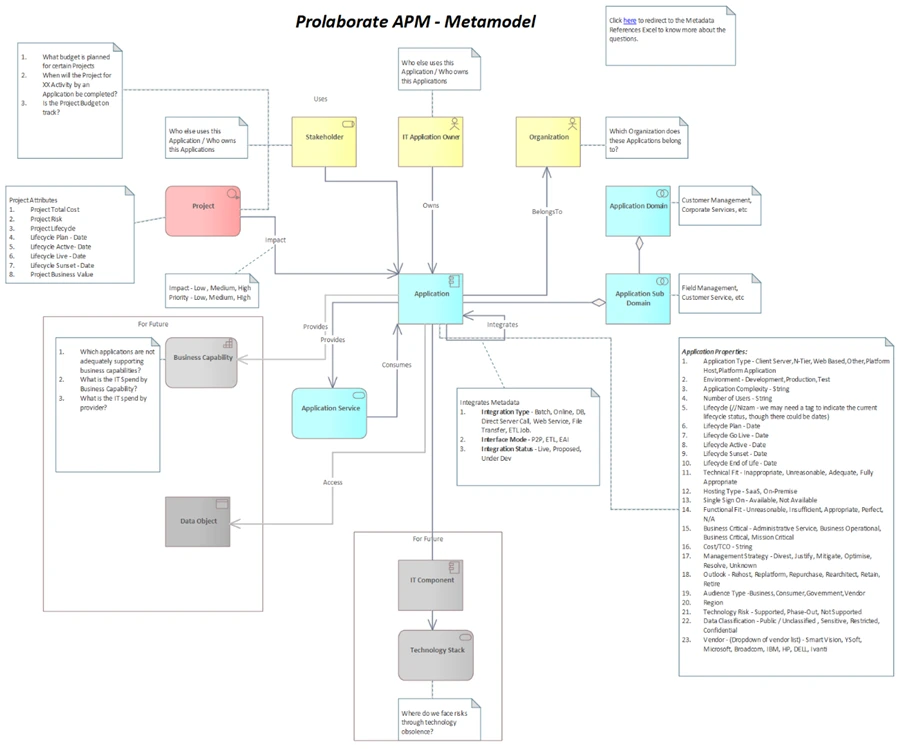
Standardizing our metadata is what makes our systems work together and makes information easy to find. It’s a simple concept, but the impact is huge. Right now, one team might use “HR,” another “Human Resources,” and a third “Personnel.” When that happens, our analysis tools can’t group the data correctly, and anyone searching for “all HR apps” will get incomplete results. Tags are really just pre-defined terms that simplify how we categorize things. They create a standard vocabulary. This way, the system knows that all three of those terms refer to the same concept. For our APM, having a controlled vocabulary means that critical fields like domain names, hosting types, and lifecycle states are always consistent. This is the only way we can get accurate reports and make smart decisions.
Good standards also clear up ambiguity. Without them, what happens? An application might get tagged with both “security” and “risk” because nobody is sure which one to use, or if they overlap. A controlled vocabulary fixes this by defining the terms and their relationships, which stops that kind of duplication. These standards are also a huge help for data lineage and governance. When fields are defined clearly from the start, it’s much easier to trace data as it moves across systems and make sure its meaning isn’t lost. Finally, this all rolls up to a better user experience. When a user is in a portfolio dashboard (like those in Prolaborate), they need to be able to filter by a category and trust they are seeing everything. That only works if the tags are applied consistently by everyone.
Designing Controlled Vocabularies
A controlled vocabulary is simply an official, pre-approved list of terms, complete with their definitions. It can be a complex hierarchy (a taxonomy) or just a simple list. When building one for our APM, we need to focus on four key steps:

- Identify key categories: Start with the big buckets. This means things like Domains (e.g., Finance, Operations), Criticality, Hosting Types, and Lifecycle States. Each of these categories will need its own defined list of values.
- Define terms clearly: Don’t just list a term; explain it. Provide a clear description and examples. For instance, the “Finance” domain shouldn’t just be a word; it should be defined as “applications supporting accounting, budgeting, and treasury functions.”
- Use hierarchical relationships: This is about creating a APM taxonomy and data model, which is just a fancy word for organizing tags from broad to specific. A great example is having a top-level domain like “Operations,” which then branches into sub-domains like “Manufacturing” and “Supply Chain.” This structure makes browsing and filtering much more intuitive.
- Include synonyms and aliases: People will use different words for the same thing. We need to capture that. Document common synonyms (like “HR” and “Personnel”) but officially designate one “preferred term” (“Human Resources”). The system should enforce the preferred term during data entry but keep the aliases so that searches for “HR” still find the right items.
Application Portfolio Management (APM) Tools like the Enterprise Architect glossary or Prolaborate’s tag libraries, for example, can be used to store and manage these vocabularies. It’s also vital to have a simple way for users to suggest new terms. Those suggestions should then go to a taxonomy governance committee for review and approval.
Tags, Aliases & Synonym Management for Application Portfolio

Tagging is the action of applying these controlled terms to our actual applications. This is what simplifies our categorization. In our APM, the process should follow these rules:
- Apply multiple tags: An application rarely fits in just one box. It might belong to multiple domains or use several technologies. We must use tagging for this, not free-text fields, because tags can be properly searched and grouped.
- Handle synonyms and aliases: The system needs to be smart. When a user searches for “HR,” they must find applications tagged “Human Resources.” This “alias resolution” is a feature that can be configured in tools like Prolaborate. We also need to maintain a list of “deprecated” tags to stop people from using old or incorrect terms.
- Use prefixes or namespaces: To prevent confusion, it’s a good practice to prefix tags with their category. For example: Domain:Finance or Tech:Java. This makes long lists of tags much clearer to read.
- Control tag creation: This is critical. We can’t let just anyone create new tags; that’s how we got into this mess. The ability to create tags must be restricted to the governance stewards. Everyone else should use the request process we mentioned earlier.
This same logic for aliases also applies to application names. We all know that apps often have multiple names (an official long name, an acronym, and maybe an old project name). We need to designate one as the “official name” for reporting and store all the others as aliases. This practice is key to naming consistency, ensuring reports are clean and consistent, but people can still search using the terms they know.
Application Portfolio Management (APM) Governance & Implementation
Creating these standards is the first step; governing them is the long-term commitment, requiring clear best practices for governance, lifecycle, and roles. To make sure these standards stick and remain effective, we need to implement these practices:

- Stewardship roles: We need to assign specific people as “metadata stewards.” Their job is to maintain the vocabularies and review new tag requests. A RACI framework is perfect for this: clearly define who is Responsible (the steward), Accountable (governance lead), Consulted (domain experts), and Informed (app owners).
- Change control: When a term is changed or an old tag is retired, we can’t just delete it. We must document why the change was made, notify users, and provide a clear mapping from the old term to the new one. This prevents broken reports and confusion.
- Training and Onboarding: We have to teach people how to use this. All users need to be educated on how to apply tags correctly, where to find the controlled lists, and how to request new terms. Providing clear examples and “do-not-use” lists will be very helpful.
- Tool integration: Controlled vocabulary can be implemented in modeling and portfolio tools, for instance by using enumerations in Enterprise Architect or tag libraries in Prolaborate. We can even use validation scripts to block unapproved tags from being entered and to proactively suggest the correct, approved terms.
- Periodic review: This isn’t “set it and forget it.” We must schedule regular audits to see how metadata is being used. This is our chance to find and clean up unused or redundant tags, review the synonym lists, and double-check that searches are returning the right results.
A central governance committee made up of enterprise architects, data stewards, and key business representatives should oversee this entire effort. They’ll need to meet regularly to review new term requests, resolve any conflicts, and keep definitions up to date. This committee is the heart of your taxonomy governance, ensuring your vocabulary evolves as the business changes, while still maintaining that all-important consistency.
Our Experts can help jumpstart your APM with well-defined decision-grade metrics, aligned governance and role-based dashboards.
In the end, managing an application portfolio effectively just isn’t possible without strong APM metadata standards. This means establishing a controlled vocabulary, a clear tagging strategy, smart alias management, and a dedicated governance process. As we’ve seen, this is what ensures categorization is consistent and meaningful. By defining our terms clearly, managing synonyms so search actually works, and controlling how tags are created, we build a foundation of trustworthy data. Tools like Enterprise Architect and Prolaborate, for example, provide features that can support this. It’s the combination of stewardship, change control, and user training that will ultimately create the consistency we need for accurate reporting, efficient search, and effective governance across our entire portfolio.


