
Managing an application portfolio is a lot like maintaining a house. If you just keep a list of what is owned, things will eventually break. To really stay on top of it, application modernization planning must be active, not reactive. This means proactively spotting the cracks in the foundation before the roof caves in.
That’s where predictive APM comes in. It helps identify which applications are turning into liabilities so they can be prioritized for modernization, consolidation, or retirement. To support this, organizations are increasingly turning to comprehensive KPIs & APM decision dashboards with Sparx EA & Prolaborate to visualize the entire landscape and drive strategy.
The real power of modernization planning analytics comes when data points are no longer viewed in isolation. By Integrating Sparx EA APM Data containing usage statistics, cost metrics, and technology health assessments, patterns emerge that indicate exactly which apps need attention and when.
Turn static models into actionable insights. See firsthand how to visualize application lifecycles, costs, and risks in real-time.
How to Spot Legacy Application Before They Fail
Legacy applications rarely fail without warning. Usually, they signal for help long before they crash. The trick is recognizing those signals early enough to take action.
Here are specific red flags to look out for:
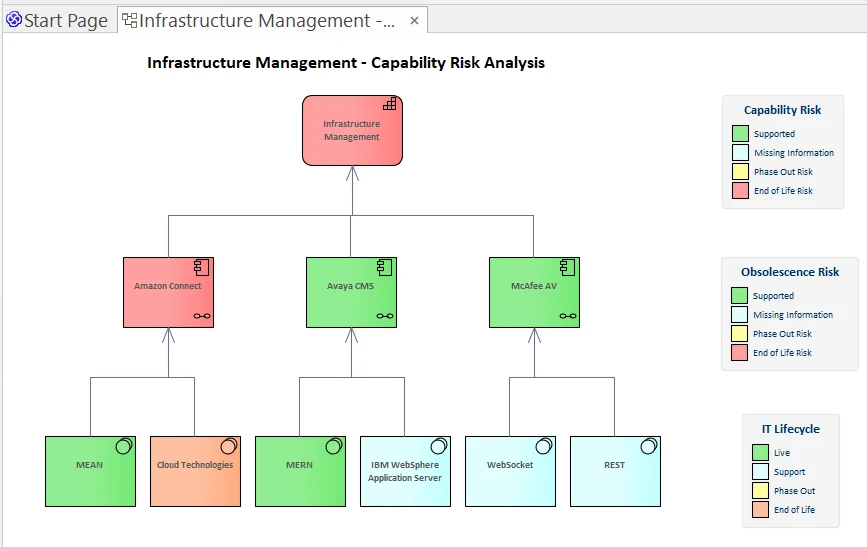
- Rising Operational Costs: If incident rates, downtime, or support tickets are climbing steadily, the app is costing more than it’s worth. This is often seen with apps that have high overhead but low business value.
- Obsolete Technology: This is the most obvious one. If a system is running on end-of-life (EOL) platforms or unsupported frameworks, then it is a major liability for security and compliance.
- Integration Isolation: When an app can’t talk to newer systems or requires expensive custom code just to connect to a cloud service, it’s becoming a disconnected component. That isolation slows down everything else.
- Declining User Base: If users are abandoning an internal tool for a newer workaround, the app has likely lost its business value.
Inside Sparx Enterprise Architect (EA), these signals are captured using tagged values and relationships to technology components. Live incident data can even be imported from an ITSM system to make the analysis real-time. By tracking these fields, the candidates for modernization practically identify themselves.
Combining Usage, Cost & Tech Health Insights with Prolaborate
One of the biggest mistakes organizations make is deciding to modernize based on a single factor, usually cost or age. But that doesn’t tell the whole story. To generate actionable APM insights, a composite view is required.
To get that, you should start Building APM Dashboards in Prolaborate that combine three critical dimensions:
- Usage Patterns: Look at the trend line. Is usage dropping? If no one is using the app, it’s not serving its purpose, regardless of how cheap it is to run.
- Cost Trends: Compare the “run cost” (keeping the lights on) against the “transform cost” (innovation). Spending a fortune just to maintain the status quo is a problem.
- Technical Health: This score indicates how maintainable the stack is. A low health score combined with high usage or high cost represents a burning platform.

In Sparx EA, these scores can be mapped to application elements via tagged values. They can then be visualized in Prolaborate, creating dashboards that highlight the apps needing urgent modernization. It moves the conversation from “I think we should fix this” to “The data shows we must fix this”.
Modeling Modernization Candidates in Sparx Enterprise Architect
Once candidates are identified, the actual Rationalization Decisions need to be modeled. It’s not enough to just flag them in a spreadsheet; this logic should live in the architecture repository to support ongoing application modernization planning.
Here is a practical way to set this up in Sparx EA:
Define Your Options
Create a tagged value or custom field called ModernizationOption. Use standard industry terms like Rehost, Rebuild, Replace, or Retire. A ModernizationPriority field (High, Medium, Low) should also be added to help sort the backlog.
Add Time Horizons
Decisions need deadlines. Track a “Rationalization Horizon” for each app, essentially determining if the app is being tackled in 0-1 years, 1-3 years, or 3+ years.
Map the Blast Radius
This is where Sparx EA shines. Each application can be mapped to the business capabilities, processes, and technologies it touches. If the decision is to “Replace” a core system, knowing exactly which business processes will break during the transition is critical.
Track Execution
Don’t just plan it; track it. Add a status field to monitor progress (Planning, In Progress, Completed). This ensures every decision ties back to strategic capabilities and technology standards.
Portfolio-Level Modernization Roadmap
A list of apps isn’t a plan. A robust strategy requires a data-driven Sparx APM portfolio roadmap.
To build a roadmap that stakeholders will actually understand, aggregate the modeled data. In Sparx EA, group applications by their modernization option and priority. Then, organize them by business domain.
Once that structure is in place, switch over to Prolaborate. Use the roadmap widgets to visualize the plan over time. This effectively turns architectural data into a Gantt chart that shows:
- Upcoming waves of modernization.
- Key milestones like “Platform Upgrade” or “Cloud Migration.”
- Dependencies between projects.

This roadmap becomes the guiding document. It helps allocate resources based on business priority rather than just fighting the biggest fire.
Communicating Insights to Executives via Prolaborate
The hardest part of an architect’s job often isn’t the technical work, it’s effectively Presenting APM Findings with Prolaborate to get leadership to buy in. Executives don’t want to see UML diagrams; they want to see risk, value, and timelines.
Prolaborate is fantastic for this because it curates the view for non-technical stakeholders.
The Risk vs. Value Quadrant
If executives are shown only one chart, make it this one. It’s a simple 2×2 matrix that plots Business Value against Risk (technical debt, compliance, etc.).

- High Value / High Risk: These are critical problems. Modernize them ASAP.
- Low Value / High Risk: Why are these being kept? Replace or Retire them.
- High Value / Low Risk: These are the workhorses. Keep them healthy and optimized.
- Low Value / Low Risk: Potential candidates for retirement if they aren’t costing much.
The Modernization Pipeline
A modernization pipeline view shows the timeline for modernization across your portfolio. In Prolaborate, this can be visualized as:
- A roadmap view displaying each application’s rationalization option (Rebuild, Rehost, Replace, etc.) and planned horizon.
- Key milestones for each application (e.g., platform upgrade, migration, decommissioning).
This view provides a clear roadmap for when each application will be modernized, helping executives see the long-term picture while also tracking short-term progress.
Cut Months of Setup into Days—Start with Proven Sparx Application Portfolio Management Templates
Modernization isn’t about guessing; it’s about precision. By combining the rigorous modeling of Sparx Enterprise Architect with the executive-friendly dashboards of Prolaborate, static data is transformed into a dynamic strategy. This approach ensures that you aren’t just fixing old code, but actively building a resilient, future-proof portfolio driven by facts.


