
Enterprise Architecture (EA) and Application Portfolio Management (APM) share one core goal: ensuring technology investments deliver business success. The challenge? They are often practiced in isolation. EA teams model future roadmaps, while APM teams focus on application costs, risks, and lifecycles.
When connected, they provide powerful end-to-end traceability. You can finally draw a straight line from a high-level strategy down to a specific application. This connection grounds your decisions, ensuring modernization efforts are tied directly to business value and solid architectural principles.
In this guide, we’ll walk through a practical approach for implementing this, using Sparx Systems Enterprise Architect, Pro Cloud Server, and Prolaborate as our examples.
Cut Months of Setup into Days—Start with Proven Sparx APM Templates
Minimal Metamodel for Integration

You don’t need a massive, complex data model to get started. A compact and extensible APM metamodel, which is really just a simple map of your key information, keeps the entire program lightweight but still allows for powerful analysis.
Core Elements
- Strategies & Initiatives: This is the ‘why’. What are the big outcomes, principles, and programs driving investment?
- Capabilities: This is the ‘what’. What does the business fundamentally do, regardless of who does it or what system they use?
- Applications: The actual systems people use to get work done. This is where you attach all those APM details: cost, risk, technical health, lifecycle stage, and hosting info.
- Interfaces: The ‘how’. This covers the logical and physical connections, data flows, and dependencies between systems.
- Risks: Any business or technical exposure. You’ll want to link these directly to the capabilities, applications, or interfaces they affect.
Relationships
The real magic happens when you link these elements:
- Strategy → Capability (shows what capability the strategy enables)
- Capability ↔ Application (shows what capability the application supports)
- Application ↔ Application (shows interfaces)
- Risk → {Capability | Application | Interface} (shows what the risk impacts)
Start small. You can always add data entities, processes, or other technology domains later as you assess and improve your APM maturity. The key is to maintain this core metamodel in a central tool (like Enterprise Architect) so that your dashboards (in a tool like Prolaborate) always show a consistent, accurate picture.
Capability to Application Mapping

A capability-to-application matrix is the single fastest way to find where you have major redundancies and critical gaps.
How to Build
- Chart your capabilities: Go two or three levels deep for clarity. Any more and it gets too complex; any less and it’s not useful.
- Connect your applications: Be disciplined here. Link applications only to the primary capability they enable. If you assign them to everything they touch, the map becomes a mess and loses all meaning.
- Summarize the data: Roll up those APM scores (cost, risk, health) to the parent capability level. This is what lets you have value-driven conversations with business leaders.
What It Reveals
- Multiple, overlapping systems trying to do the same job (these are your top consolidation candidates).
- Critical business capabilities that have little or no technology supporting them (this is where you need to invest).
- Cost and risk hotspots concentrated in specific business areas.
Traceability from Strategy to Decisions
You must connect the dots. Linking these “artifacts” (your strategies, apps, etc.) is what makes every portfolio decision completely explainable and auditable.
- Strategy → Capability: Shows why a particular business capability even matters.
- Capability → Application: Shows which applications are supposed to be delivering that capability.
- Application → Projects / Roadmaps: Shows when those systems are scheduled to be modernized, replaced, or finally retired.
- Risk → Decision: Provides a clear record of how known risks influenced the final choices.
Role Based Viewpoints
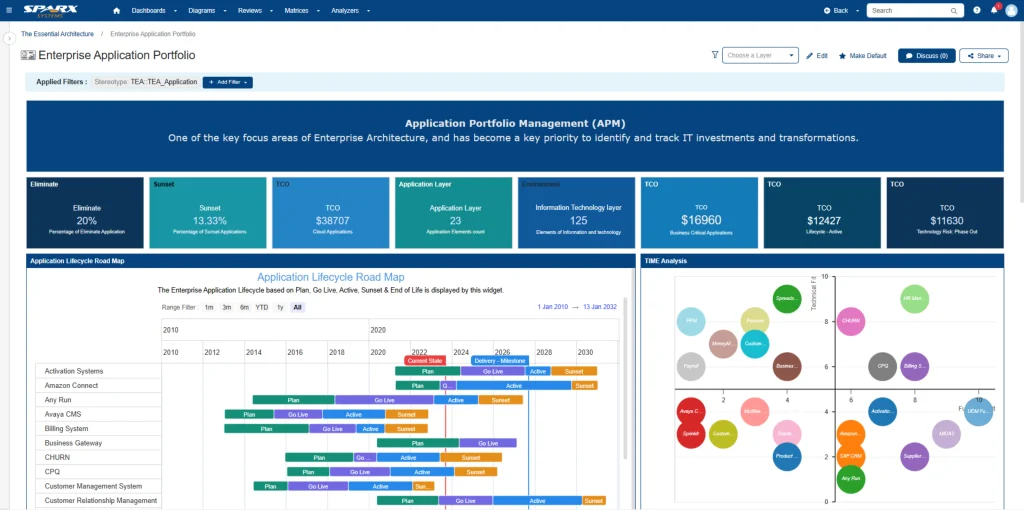
Different people need different information. You must avoid the trap of ‘one-size-fits-all’ dashboards and use executive-ready application portfolio assessments for effective engagement.
Executives
They need the big picture. Show them strategic capabilities plotted against cost, risk, and value. They care about investment priorities and tracking the benefits.
Architects
They live in the details. They need to see technology stacks, design patterns, interface complexity, and how everything complies with standards. Their focus is on target architecture options and migration paths.
Application Owners
They have a practical focus. They need to know their system’s cost, usage stats, lifecycle status, all its dependencies, and what actions are required of them.
Portfolio Managers
They are looking for trends. They need to compare different business domains, identify candidates for disposition, and check the status of various roadmaps.
It’s also critical to set access controls (for example, in Prolaborate) so that sensitive financial or risk data is restricted to only those who truly need to see it.
Operating Model: Who Updates What and When
This kind of integration only stays healthy if everyone knows their job. Responsibilities and update cadences must be made explicit, using a clear application ownership model.
Responsibilities
Here’s a common breakdown of roles:
- Model Stewards (Enterprise Architects): Manage the core data model, naming conventions, and overall quality.
- Business Architects: Maintain the capability maps and confirm their application mappings.
- Application Owners: Refresh their APM attributes (cost, risk, etc.) monthly and validate system interfaces.
- Portfolio Managers: Curate the roadmaps, prepare governance review packs, and track the benefits as they are realized.
Cadence
A regular rhythm is key:
- Monthly: Data refresh and initial issue triage.
- Quarterly: A full review of capability mapping, rationalization board meetings, and roadmap updates.
- Annually: Review and calibrate the scoring models and refresh technology standards.
This process can be a huge manual effort, so automate as much as you can. Use integrations (like those in Pro Cloud Server) to pull data directly from your CMDB, finance systems, and CI/CD pipelines where possible.
Decisioning & Roadmaps
Now you move from analysis to action. This requires a clear, standard set of decisions and a visual plan that everyone can follow.
Common Dispositions
Most decisions will fall into one of these buckets:
- Retire (get the cost and risk out)
- Replace (move to a better-fit solution)
- Rehost / Replatform / Refactor (modernize on a spectrum)
- Retain (keep it, but with a clear improvement plan)
Roadmap Artifacts
Your roadmap isn’t just a timeline; it should include:
- Consolidation and modernization waves
- Key milestones (approval, deployment, retirement)
- Readiness criteria, rollback plans, and communication plans
Publish these roadmaps where stakeholders can see them (like in Prolaborate). Using visual charts, like a bubble chart showing cost vs. value vs. risk, is an incredibly effective way to help leaders prioritize the work.
Measurement: KPIs That Prove Integration Works
You have to prove this is working. Tracking specific outcomes is the only way to sustain sponsorship from leadership and get the feedback you need to refine your model.
- Coverage: % of applications with complete metadata and capability links.
- Decision Velocity: How many decisions are made per quarter? What’s the average cycle time?
- Cost Reduction: What are the actual savings from retirements/consolidations compared to your baseline?
- Risk Reduction: Are you reducing the number of end-of-life components and critical vulnerabilities?
- Agility: Are you seeing improvements in lead time for change or deployment frequency?
FastTrack Your APM Efforts and Maximize ROI with Sparx Systems North America’s Expert Consulting
Ultimately, integrating APM into EA creates that single source of truth that every organization needs to connect its strategy directly to its execution. It’s a journey. But by starting with a simple data model, focusing on capability mapping, building traceability, and using role-based views and a disciplined operating model, any organization can start making faster, better-justified decisions.
This is where tools come in. Platforms like Sparx Systems Enterprise Architect, Pro Cloud Server, and Prolaborate are designed for this, enabling the collaborative modeling, secure data access, and stakeholder dashboards required to turn this integration from a one-time project into a daily business practice.


