
Applications, like any product, pass through a life of their own from first launch to final retirement. When that journey isn’t visible, teams miss upgrade windows, risk security gaps, and carry unseen technical debt. A lifecycle roadmap fixes this by laying out, in plain view, when an application was introduced, which major upgrades landed, and when replacement or retirement is expected. It helps stakeholders anticipate end‑of‑life events and line up modernization with business goals. Think of it as a practical planning aid that connects day‑to‑day maintenance with what the organization is actually trying to achieve.
In most enterprises, applications outlive the original plan. Budgets shift, teams get busy, upgrades slip. Over time, that quiet backlog turns into real exposure with unsupported platforms, surprise outages, and compliance issues, which is why APM is critical in modern enterprises. A lifecycle roadmap brings these issues into the open. By mapping each application’s history alongside near‑term milestones, you can spot clusters of aging systems and schedule modernization before problems escalate. The payoff: fewer fire drills and a steady, intentional pace of change.
Hands-on training covering model setup, portfolio attributes, and dashboard configuration for Application Portfolio Management (APM) use cases.
What Is an Application Lifecycle Roadmap?
An application lifecycle roadmap shows the main phases in an application’s life and usually aligns with familiar Application Lifecycle Management (ALM) stages like requirement definition, development and testing, deployment, maintenance, and retirement. In an APM context, the view stays high‑level: launch date, current support status, planned upgrades, and a target sunset. Seeing those markers together helps portfolio owners understand how long a system has been in service and when action is due.
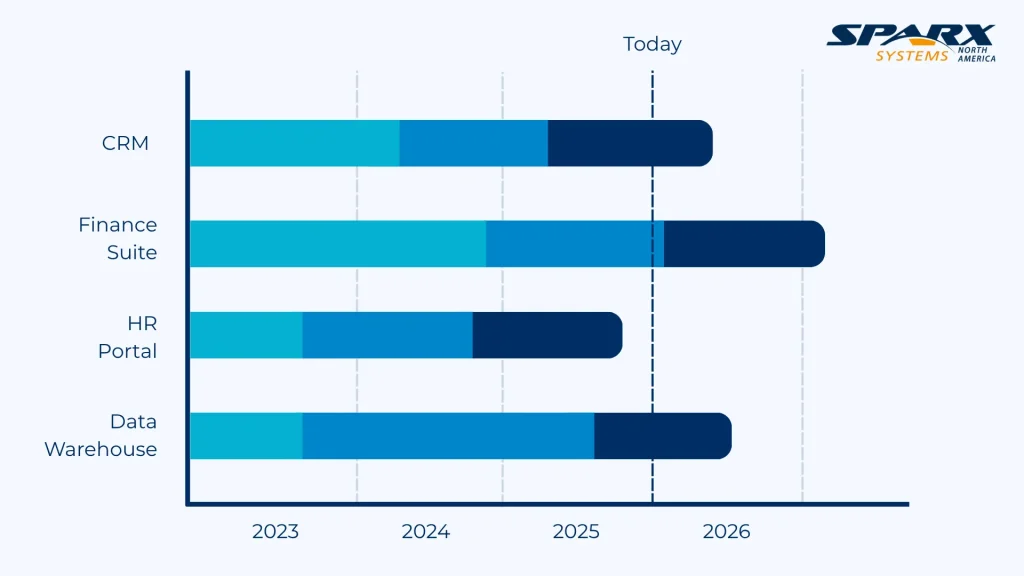
Most roadmaps are simple horizontal timelines. Each application appears as a bar or swimlane spanning its active life, with markers for big moments such as go‑live, major upgrades, migrations, decommissioning. Colors or patterns signal phases such as Active, Maintenance, Modernization, and Retirement. It’s also useful to flag vendor end‑of‑support dates, compliance deadlines, and dependencies. When you bring all apps into one view using consistent application classification, overlapping lifecycles stand out and can be planned together.
Phases of Application Lifecycle Management and Their APM Implications
Before diving into steps, here’s the map: ALM outlines how software moves from idea to retirement. Knowing these phases keeps timelines honest, clarifies ownership, and prevents surprises during upgrades.
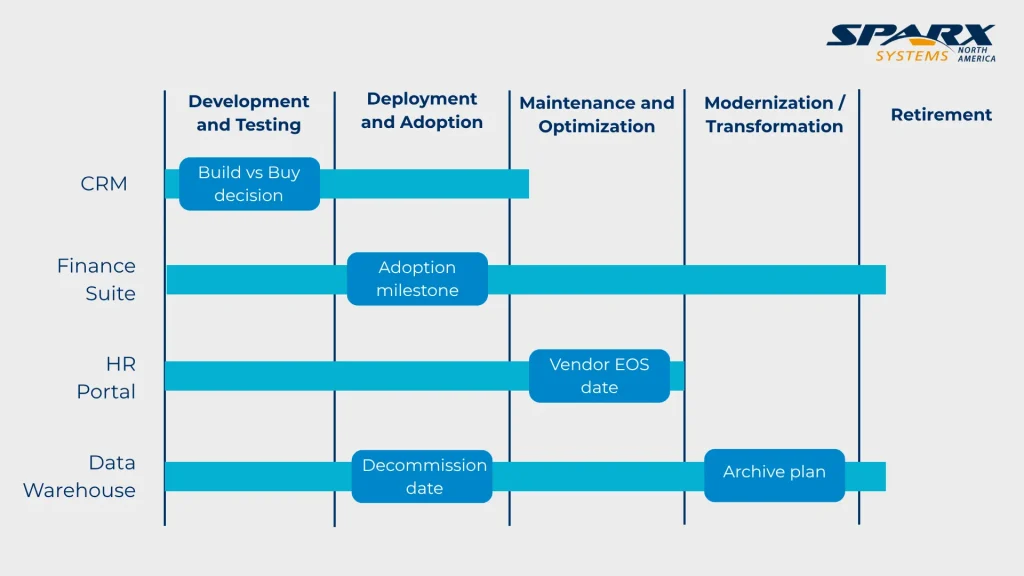
Understanding the ALM stages makes any roadmap easier to read:
Requirement definition
In APM, this stage corresponds to identifying business needs and selecting or developing applications to meet them. The roadmap begins here, capturing the decision to acquire or build a system.
Development and testing
For internally developed applications, this phase includes design, coding, and quality assurance. Externally sourced applications also undergo configuration and integration testing. Documentation in the roadmap ensures that stakeholders know when the application entered production.
Deployment and adoption
After testing, applications are deployed to production and adopted by users. The roadmap can show adoption milestones, such as the completion of user training or the migration of all departments to the new system.
Maintenance and optimization
The longest phase, where applications receive patches, performance tuning, and minor enhancements. Technical debt can accumulate here if upgrades are deferred. Roadmaps can indicate planned patch cycles, vendor support end dates, and the last upgrade performed.
Modernization or transformation
When an application no longer meets business requirements or poses risk, it enters a modernization phase. This may involve migrating to a new platform, refactoring code or replacing the application entirely. The roadmap should show the start and end of modernization projects and dependencies on other initiatives.
Retirement
Finally, applications are decommissioned. The roadmap must include retirement dates and plans for data migration, archiving and user transition. Noting retirement milestones prevents surprises and ensures compliance with data retention policies.
By aligning APM roadmaps with ALM phases, organizations can ensure that each application’s journey is fully documented and that technical decisions support strategic outcomes.
Importance of Lifecycle Visualization in Application Portfolio Management (APM)

Lifecycle roadmaps deliver practical benefits:
- Spot aging systems early: Systems beyond their planned life carry support and security risk, which becomes easier to communicate using risk exposure visualizations such as pie charts. Roadmaps surface them so you can plan upgrades or replacements ahead of time.
- Plan modernization in waves: If several apps reach end‑of‑support in the same window, bundle the work. This reduces disruption and often improves vendor negotiations.
- Manage technical debt with intent: Visual markers for deferred maintenance and end‑of‑life help quantify debt and prioritize the fix.
- Set expectations with dates: Clear timelines help executives and business units prepare budgets, training, and change plans.
- Support compliance: Keep regulated systems on supported versions and show deadlines in the timeline, so they aren’t missed.
Building a Lifecycle Roadmap
Use this sequence to build a roadmap people will actually use:
- Inventory applications: Capture key dates for each application, including release date, major upgrades, latest patch and planned retirement. Document dependencies, such as integrations with other systems or reliance on specific technologies.
- Define phases: Define phases by breaking down the lifecycle into clear application lifecycle states and sunset policies such as Active, Maintenance, Modernization, and Retirement. Agree on a clear application lifecycle states and definitions with stakeholders to ensure consistent classification.
- Plot timelines: Use a timeline or Gantt chart to plot each application’s phases over years or quarters. Color‑code phases for clarity and use markers for significant events like vendor support end dates or regulatory deadlines.
- Highlight dependencies: Show relationships between applications, such as when replacing a legacy system depends on the rollout of a successor. Dependencies may also include shared databases, middleware, or infrastructure.
- Analyze clusters: Once plotted, look for clusters of applications entering modernization or retirement at the same time. Use this insight to schedule projects in waves, balancing resource capacity with urgency.
- Review and update: Roadmaps are living documents. Review them regularly with technical leads, business owners, and risk managers. Update timelines when projects are delayed, requirements change, or new risks emerge.
Centralizing this information helps teams sequence modernization and retirements with less disruption. It also clarifies when capital spend will land, so budget planning doesn’t become a guessing game.
Using Roadmaps for Communication and Alignment

Use Roadmap charts when there is a need to keep everyone aligned. It clarifies priorities, exposes dependencies, and sets expectations, so executives, teams, and business owners coordinate decisions, manage risks, and move together without surprises.
Roadmaps also align different audiences:
- Executives: High‑level roadmaps show when significant investments will occur and how they align with strategic initiatives. Executives can use this information to approve budgets and prioritize projects by pairing roadmaps with bar graphs that track application costs and value.
- Project managers: Detailed roadmaps inform project scheduling, resource allocation and risk management. They also highlight dependencies that project managers must coordinate.
- Business units: Business owners can see when applications they rely on will change, allowing them to plan training and process adjustments. Roadmaps help manage expectations and reduce resistance to change.
- Compliance officers: Roadmaps illustrate when applications must be upgraded to meet regulatory requirements, enabling proactive compliance management.
Share the roadmap in governance forums and working sessions, so everyone operates from the same page. Application Portfolio Management (APM) Prolaborate dashboards can present interactive charts, graphs and reports, letting stakeholders drill in only when they need more detail.
Challenges and Best Practices
Keeping a roadmap healthy takes effort. The usual snags: missing data, changing priorities, and teams making decisions in silos. To keep momentum, it’s important to follow established best practices for governance, lifecycle, and roles:
- Establish governance: Name an owner for the data and the view. Tie updates to release/change processes and put reviews on the calendar.
- Integrate data sources: Pull dates from CMDBs, project trackers, and vendor notices wherever you can cut manual updates.
- Balance detail and clarity: Show enough to plan effectively without crowding the screen. Offer drill‑downs for deep dives.
- Adapt to change: Priorities evolve; the roadmap should, too. Build in time to revisit and adjust so the view stays trusted.
Handled this way, the roadmap stays accurate and useful rather than a forgotten slide buried in a shared drive.
Use Cases: Modernization Planning and Tech Debt Management
Use this roadmap in practice through these scenarios. Each turns dates into decisions, helping teams schedule modernization, reduce risk, align budgets, and keep delivery on track without surprises or last‑minute firefighting.
Lifecycle roadmaps help with several planning needs:
- Modernization planning: Group apps nearing end‑of‑support into waves; align with platform upgrades, cloud moves, or adoption of managed services.
- Technical debt remediation: Call out systems stuck in extended maintenance and prioritize refactoring or replacement. Time the work to business cycles to reduce disruption.
- Resource allocation: Stagger major changes to avoid team overload; map spend quarters and fiscal years, so progress is sustainable.
- Regulatory compliance: Keep regulated systems on supported versions and show remediation milestones in the roadmap, so they remain visible to all stakeholders.
With a clear view of lifespans, teams can make proactive calls instead of reacting to outages. The same view can guide vendor conversations so support commitments to match planned retirement dates.
Get a guided walkthrough of Enterprise Architect + Prolaborate dashboards, and visualization use cases tailored to your portfolio and priorities.
An application lifecycle roadmap is a practical way to manage software longevity and keep technical debt in check. By making it obvious when systems launch, how they’ve evolved, and when they should retire, APM teams can plan modernization, coordinate resources, and communicate clearly across the organization.
Aligning the roadmap with ALM phases adds structure and keeps technical work tied to business outcomes. Sparx Systems Enterprise Architect and Prolaborate include features for creating and sharing these roadmaps; teams can use them to keep stakeholders informed. Bringing lifecycle roadmaps into your APM practice strengthens governance, reduces risk, and supports steady, strategic change.


