
When IT budgets get tight, software is often the first major expense to be reviewed after labor costs. The challenge is, many organizations don’t have a firm grip on exactly how many applications they’re running, what’s the cost of running them, or even if the applications are providing real business value.
This is exactly why application portfolio management is becoming critical for modern enterprises, as it brings clarity to application cost, usage, and business value. It’s a systematic approach to finding redundant tools, correcting over-licensed contracts, and retiring systems that are no longer pulling their weight, all while achieving long-term cost efficiency.
The numbers are stark. Industry analysts believe that without this kind of cleanup, most companies are overspending on software by at least 25%. That number gets even bigger during mergers, where you can find that up to 30% of IT systems are duplicates or just plain obsolete. In this article, we’ll break down how you can reduce IT costs with APM and show how Application Portfolio Management (APM) tools such as Sparx Systems Enterprise Architect and Prolaborate can help you see and track the cost savings from APM.
Discover prebuilt templates, dashboards, and governance workflows in Sparx Systems Architecture Platform to fast-track APM outcomes.
Cost Levers: Licenses, Maintenance, Integrations and Infrastructure
To find savings, you first have to know where to look. The cost of software isn’t just the price tag on the license; the real expenses are often buried in other areas. The most important cost factors are:

1. Licenses and Subscriptions
This is the obvious one. Companies often pay for more licenses (or “seats”) than they actually use. This problem gets worse with “Shadow IT” especially when departments buy their own software without telling IT. Experts have found that in many companies, 40% of the applications are completely off IT’s radar, all adding to the bill.
2. Maintenance and Support
Old, outdated systems are expensive. They often need specialized (and costly) support contracts to keep them running. We call these “zombie” applications: they’re technically alive, but they stick around long after a new, better system has been put in place.
3. Integration and Customization
Every time you add a new app, you have to connect it to your other systems. These custom, point-to-point integrations are fragile and time-consuming for developers to build and maintain. More apps simply mean more complexity and more hidden costs.
4. Infrastructure and Hosting
For software you host yourself, you’re paying for servers, databases, and the people to manage them. Moving to the cloud can help, but it only saves money if you actually turn off the old, redundant applications you’re migrating from.
Finding Redundancy Through Capability Mapping
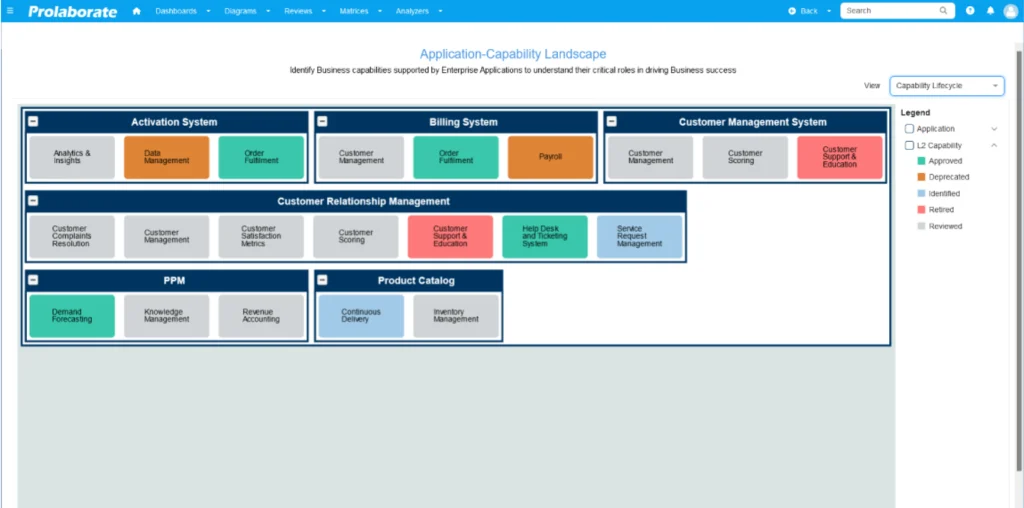
It’s common for redundancies to fly under the radar. The marketing team buys a project management tool, while the engineering team buys a different one that does the exact same thing.
To find these overlaps, you need to connect your software to what your business does. This is called capability mapping. You take a business function (like “Customer Relationship Management” or “Project Planning”), list every single application that supports it, and then look at the cost and usage for each. When you lay it all out, the problems become obvious:
- Duplicate Functionality: You find multiple tools are being used for the same job. The clear solution is application consolidation: moving everyone onto a single, standard platform.
- Underutilized Licenses: You see that you’re paying for 500 seats of a tool but only 50 people are actively using it. This is a clear signal to right-size the contract or repurpose those unused licenses.
- Shadow IT: You uncover applications that were bought on a company card without any formal approval. Now you can make a decision: either bring them into the official fold or retire them.
Prioritize Applications by Impact and Spend
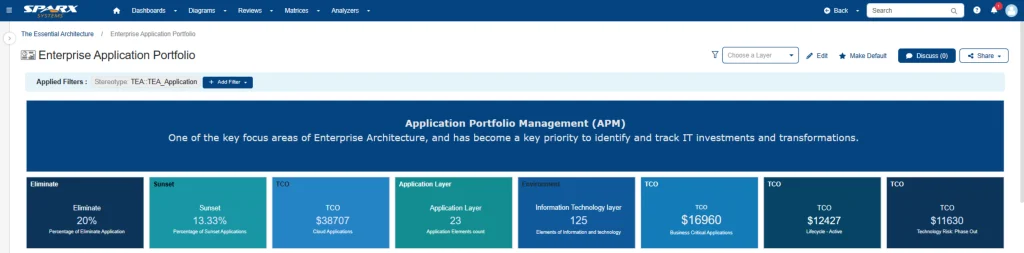
Once you see all the waste, you have to decide where to start. You can’t tackle everything at once. The best way is to create application classifications based on simple scoring system to rate each application on three key factors: its cost, its value to the business, and its technical condition.
- Cost Score Create a simple TCO model (Total Cost of Ownership) that combines license fees, support contracts, and infrastructure costs. Any application with a high TCO and very few users is an immediate target for retirement.
- Business Value Score How critical is this app? Does it run a core part of the business or help generate revenue? A tool might be expensive, but if its value is high enough, it’s obviously a keeper.
- Technical Health Score Is the application up-to-date? Is it still supported by the vendor? Is it a security risk? How complicated is it to maintain? An old, insecure, or unsupported system is a liability, costing you more in risk and maintenance every day.
Build the Case to Retire or Replace
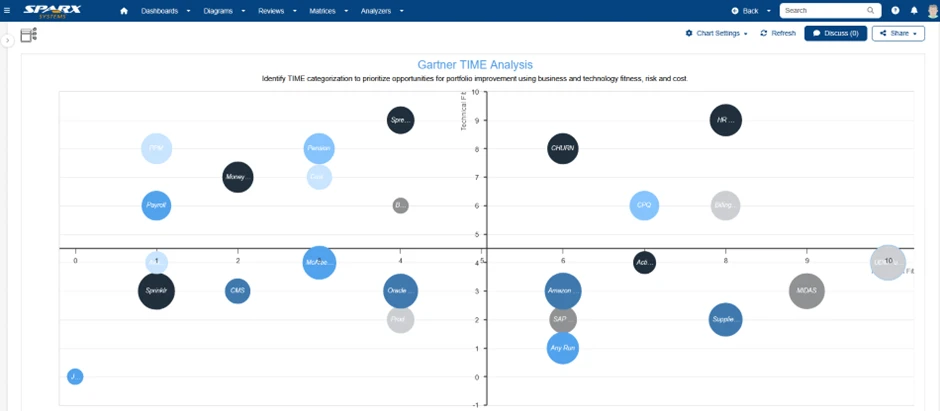
Now that your scoring has pointed out the problem applications, you need to get buy-in from leadership to actually do something. This is the critical step for achieving real cost optimization through application rationalization. This proposal should include:
- Current Spend Show what you’re paying for the application right now (based on your TCO model) and how that cost compares to a potential replacement.
- The Rationale A simple explanation of why this app is on the list. Is it a duplicate? Is nobody using it? Is it technically obsolete and risky?
- The “Disposition” What do you plan to do with it? This is where you make one of the key 5R decisions (like Retire, Replace, Rehost, Replatform, Refactor, or Retain). Using this common vocabulary helps everyone stay on the same page.
- Savings Estimate The bottom line. Show the projected annual savings in clear numbers, as well as the “soft” benefits, like better security or less complexity.
- Migration Plan A high-level plan for how you’ll move the data, get users onto the new system (if there is one), and safely shut the old one down.
Tools & Dashboards for Cost Optimization

Doing all this manually in spreadsheets is a nightmare. Modern APM tools are built to make this entire process easier.
For example, Sparx Systems Enterprise Architect can act as your central EA repository (Enterprise Architecture repository) for your entire application inventory, connecting apps to costs and business capabilities. The Pro Cloud Server then lets all your stakeholders work on this information securely. Finally, Prolaborate turns that data into clean, executive-friendly APM dashboards. Some of the most effective views are:
Cost–Value Heatmaps
These simple, color-coded charts are a type of application portfolio heatmap that instantly shows you which applications have a high cost but are providing low business value. They make prioritization easy.
Redundancy Matrices
A clear grid that shows you exactly where you have multiple applications trying to do the same job.
Retirement Pipelines
A timeline that visualizes which applications are scheduled to be retired or replaced, and when, often maintained as application lifecycle roadmaps to manage technical debt over time.
Savings Trackers
A dashboard that compares your spending before you started with the projected savings, letting you prove the ROI of the project.
These dashboards aren’t just for planning. They are the communication tools you use to build the business case and keep everyone on the same page while you’re getting the work done.
Looking for Expert Guidance to Kickstart Your Sparx APM Practices?
Trying to cut IT costs with a simple, across-the-board budget cut rarely works. It’s a blunt instrument that often harms valuable services. A smarter approach, a sustainable on is to first get a clear-eyed view of where your money is actually going and what value you’re getting for it. This is the whole point of Application Portfolio Management. It’s the application rationalization framework that lets you spot the waste (like that 25% overspend most companies have) and make intelligent decisions to fix it.
When you map your apps to what the business actually does, score them by cost and value, and present a clear case for retirement, the result isn’t just cost savings from APM. You also make the company more agile and secure by removing old, complex, and risky code.
The Sparx Systems toolset (Enterprise Architect, Pro Cloud Server, and Prolaborate) provides one connected platform to model your portfolio, get everyone on the same page, and visualize the savings. With the right tools, cost optimization stops being a reactive, painful budget cut and becomes a normal, proactive part of how you do business freeing up money to spend on actual innovation.


