
Kicking off an Application Portfolio Management (APM) initiative with a spreadsheet is a common first step. It’s familiar, accessible, and seems good enough for a simple list of applications, owners, and costs.
The problem is, this approach doesn’t scale.
As the portfolio’s size and complexity inevitably grow, that “simple” spreadsheet becomes a significant liability. Maintaining a single source of truth becomes nearly impossible. Tracking dependencies or producing meaningful reports is a painful manual process. Information goes stale almost immediately, and different teams create their own “shadow” versions, leading to data chaos.
This article will break down how Sparx EA can be leveraged effectively for APM use cases. We’ll look at the specific limitations of Excel-based APM and contrast them with the benefits of a centralized application repository, true end-to-end traceability, and the collaborative tools you need to finally govern and improve your application landscape.
Equip your team with the skills to build a robust APM framework. Master model repository setup, attribute management, and dashboard configuration.
Limitations of Excel-Based APM
Spreadsheets are fantastic for many things, but they were never intended to function as enterprise-level databases. When you force Excel to manage an entire application portfolio, the cracks start to show very quickly:
No “Single Source of Truth”
When you email an Excel file, you instantly create multiple “versions of the truth.” Team members edit their own copies at the same time, creating conflicting data. As a result, your team wastes hours trying to figure out which file has the correct application owner or the right annual cost. Trust in the data disappears.
Zero Traceability or Impact Analysis
A spreadsheet is just a flat list. It can’t show you how your applications connect to business processes, data, or other systems. You might retire an application that another critical system secretly depends on, which is why end-to-end traceability across complex application landscapes is essential.

Static, Instantly Outdated Reports
The moment you copy a chart from Excel into a PowerPoint slide, it’s stale. The data in the spreadsheet might change, but your report won’t. Leaders end up making decisions based on last week’s (or last month’s) numbers simply because it takes too much manual work to update every report.
Lack of Governance and Collaboration
In a shared spreadsheet, almost anyone can change critical information. There’s no easy way to see who changed what, when, or why. This creates a huge risk of unauthorized or accidental changes. It makes structured reviews and approvals nearly impossible to manage.
Complete Inability to Scale
A spreadsheet might work for 50 applications, but it grinds to a halt with 500. As you add more data, formulas break, lookups become fragile, and the file becomes painfully slow. “Silent errors” creep into your calculations, leading you to make major decisions based on data that is just plain wrong. The tool simply can’t scale with your business.
These problems aren’t just minor inconveniences. They actively prevent organizations from making smart, data-driven decisions about rationalization and investment. Instead of illuminating the landscape, spreadsheets end up hiding its true complexity.
Sparx Enterprise Architect as a Centralized Application Repository
Sparx Systems Enterprise Architect replaces spreadsheet patchwork with a single, live APM repository, Sparx Systems Enterprise Architect replaces spreadsheet patchwork with a connected APM ecosystem built on a single, live APM repository, giving everyone access to the same information. You can import existing lists from Excel or use the API. An application is no longer just a row; it’s a rich model element in your application portfolio in EA, with a defined owner, lifecycle stage, and tagged values for cost, risk, and health. This centralized data becomes the authoritative source of truth, enabling real-time collaboration.
This is where real APM governance begins. Baseline and version management track every change, while role-based security controls who can view or edit specific portfolios. These features ensure updates follow an approved process, giving stakeholders genuine confidence in the data. It’s a true enterprise repository, not just one analyst’s spreadsheet.
End-to-End Traceability: From Business to Technology
You can’t manage what you can’t see. EA’s modeling environment provides the traceability from business to technology that spreadsheets lack, connecting high-level business capabilities all the way down to application components. Tools like the Relationship Matrix create a visual map, letting you instantly see which applications support which capabilities and what their dependencies are.
This unlocks powerful “what-if” analysis. If a business capability changes, you can run an impact analysis to see every affected application. Planning to retire a system? You can see exactly which business processes will be disrupted before you make a move. This foresight helps you see the ripple effects of any decision, avoiding costly, unintended consequences.

Prolaborate Dashboards: Dynamic Governance and Collaboration
Manually updated Excel charts are outdated the moment you save them. Prolaborate dashboards, working with Sparx EA, transform your live model data into dynamic, interactive dashboards. This delivers a real-time view of the application portfolio to any stakeholder in a web browser.
Set up application health heatmaps, lists, and charts that update automatically. Users can filter the portfolio by domain, cost, risk, or lifecycle stage and drill down for details without any Sparx EA expertise or “edit” access. Prolaborate also adds vital collaboration and APM governance layers. Customized views in Prolaborate ensure users only see relevant data (e.g., CIO vs. architect). Features like comments, discussions, and “watch lists” bring the data to life, creating a transparent, auditable decision-making process that spreadsheets can’t match.

Migrating from Excel to your APM Repository in EA
The idea of moving from a “simple” spreadsheet to a full modeling repository can sound intimidating, but Enterprise Architect includes tools to make this transition manageable. A typical migration breaks down into five practical steps:
- Prepare and clean your data: Get rid of duplicates and enforce consistent naming. (This is a classic “garbage in, garbage out” problem).
- Map your attributes: Decide exactly how each spreadsheet column (like “Cost” or “Owner”) maps to a model property or tagged value in EA.
- Import the applications: Use structured Excel-to-Sparx EA import templates along with Sparx EA’s built-in CSV importer or the RESTful API to pull in your lists of applications, domains, owners, and service info.
- Link the relationships: This is the step spreadsheets can’t do. Start modeling the dependencies and mapping applications to the business capabilities, projects, or technologies they support.
- Validate and publish: Review the new model with your key stakeholders to confirm it’s accurate, then publish it to Prolaborate for live dashboarding and collaboration.
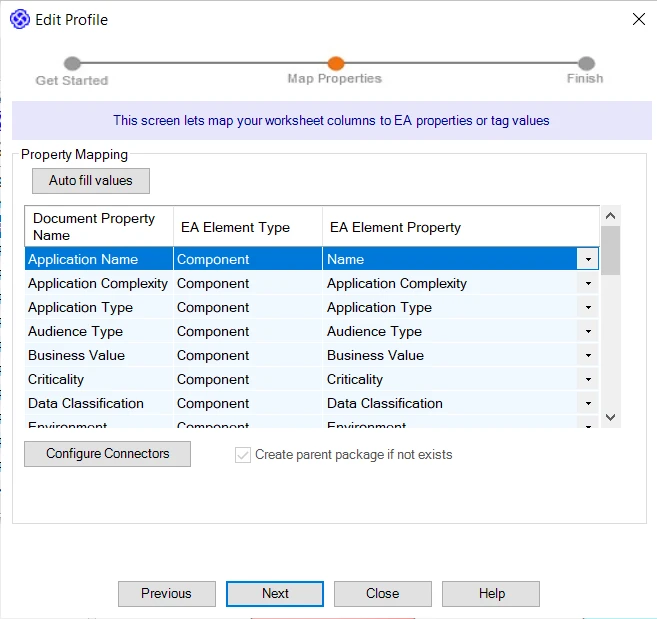
By following this process, you can move from a collection of static, disconnected spreadsheets to a governed, dynamic repository that actually supports analysis and decision-making.
Turn static models into actionable insights. See firsthand how to visualize application lifecycles, costs, and risks in real-time.
Spreadsheets will always be useful for quick, ad-hoc analysis. But they are fundamentally inadequate and risky for managing an entire enterprise-level APM. The Sparx Systems EA vs Excel debate for portfolio management isn’t really a debate at all; they are different classes of tools.
Using Sparx Enterprise Architect for application portfolio management, especially when paired with Prolaborate, provides the purpose-built platform that APM requires. You get a centralized application repository with robust versioning and security. You get true traceability from business to technology. And you get dynamic, collaborative dashboards.
Migrating your application inventory out of spreadsheets and into EA isn’t just a data-entry exercise. It unlocks the critical insights you need to successfully rationalize your portfolio, reduce costs, and finally align your IT investments with your business goals.


