
Once you are done establishing your application inventory and APM scores in Sparx Systems Enterprise Architect (EA), the next challenge is operational: How do you present APM results in a way that executives and application owners can actually use?
Prolaborate serves as the presentation and collaboration layer on top of Sparx EA, offering powerful application portfolio visualization. It allows you to transform raw model data into focused Prolaborate APM reports, lists, and review workflows that support real portfolio decisions without requiring stakeholders to open the Sparx EA thick client.
Our Experts can help jumpstart your APM with well-defined decision-grade metrics, aligned governance and role-based dashboards.
What Each Stakeholder Needs from Application Portfolio Reports
Different stakeholders require different views of the same portfolio. Prolaborate enables you to build role-based APM dashboards rather than forcing a single “one size fits all” report on your organization.
Executives and Senior Management
Senior management typically needs a high-level overview rather than granular details. They are not interested in element IDs or modeling notation; they want direction and hotspots.
- Portfolio-level picture: A summary of applications by domain, lifecycle, and hosting type.
- Clear risk and health signals: Visuals indicating how many apps are on poor tech stacks, End-of-Life (EOL) platforms, or carry high-risk scores.
- Modernization candidates: A shortlist of where spending and risk are concentrated to drive rationalization decisions.
Domain Architects and Portfolio Managers
This group requires actionable data to manage the landscape.
- Domain-filtered inventories: Detailed lists of applications including APM scores, owners, and rationalization options.
- Overlaps and gaps: Visualizations of multiple apps supporting the same capability, or critical capabilities with weak application coverage.
- Impact analysis: Views on upcoming changes, highlighting which apps, capabilities, and integrations will be affected.

Application Owners
Owners need a personalized and simplified view.
- “My Applications” list: A direct view of the specific assets they manage.
- Completeness and Health indicators: Clear metrics on assessment status, scores, lifecycle, hosting, and key risks.
- Edit access: A streamlined interface to update basic information and participate in reviews.
The Prolaborate Advantage: All these perspectives are derived from one Sparx EA repository, but filtered and presented in a format tailored to how each audience works.
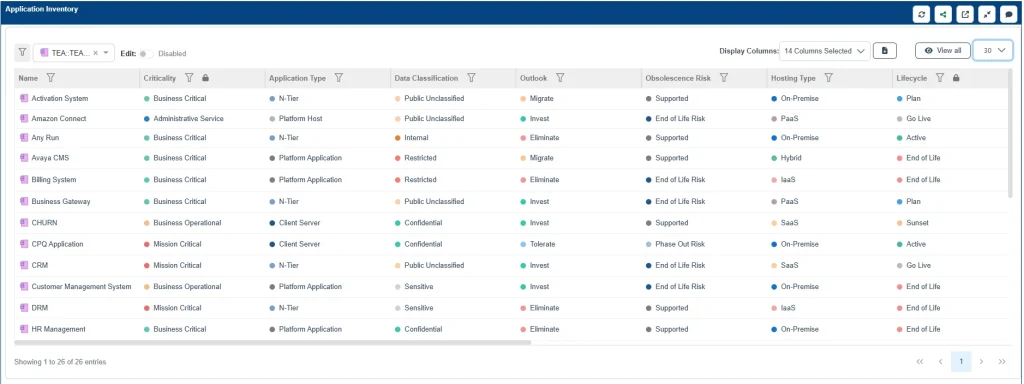
Converting Model Data into APM Dashboards
In Sparx EA, you have already defined application elements with APM tagged values (value, risk, tech health, cost) and linked them to capabilities, processes, and technologies. In Prolaborate, you convert that structure into APM dashboards that give specialized application portfolio insights.
Key Dashboard Widgets
- able Widgets: Configure these to list «Application» elements with selected fields (e.g., owners, lifecycle, scores, rationalization options). These can be filtered by domain, region, or tags for specific audiences.
- Chart Widgets: Use specific Prolaborate charts (bar, pie, or heatmaps) to visualize distributions by lifecycle, hosting type, domain, or score.

- KPIs / Tiles: Highlights simple, high-impact indicators like “Total Apps,” “High-Risk Apps,” “Apps on EOL Tech,” or “Apps marked for Replacement.”
The logic is simple: Sparx EA holds the structure; Prolaborate simplifies it into interactive charts and other visualizations.
Dashboard for Application Health
A standard health dashboard helps architects and operational leaders monitor the portfolio daily. A basic health view might include:
- Charts: Visualizing applications by technical health score.
- Lists: Highlighting apps with poor tech health but high business value (critical risks).
- KPIs: Alerting on apps running on EOL technology or those with outstanding risk assessments.
All of this is driven by live EA data but presented in a clean, consumable format.
Dashboard for Modernization Candidates
For strategic planning, a modernization-focused dashboard is essential. This view drives roadmap discussions, funding decisions, and program scoping. It might include:
- A filtered list of apps where rationalization decisions have been set to Rebuild, Replatform, or Replace.
- Key scores for these candidates (value, tech health, risk, cost) and their target horizons.
- Links to target platforms or successor applications defined in the EA model.
Sharing, Review, and Approval Workflows
APM is not just about viewing data; it is about agreeing on action. Prolaborate reviews help move teams from passive information consumption to active decision-making.
- Targeted Reviews: Create a review around a specific set of applications—for example, “All Payments Apps with Poor Tech Health” or “Candidates for Replacement in Q3.”
- Collaborative Input: Invite architects, application owners, and business stakeholders to comment, ask questions, and suggest updates within the tool.
- Recorded Decisions: Clarifications and approvals are recorded directly against the EA elements, preventing data loss in email threads.

This workflow allows application owners to validate scores, domain leads to agree on rationalization timelines, and portfolio boards to give formal approval for changes.
Exporting or Embedding Reports
While live dashboards are ideal, you will occasionally need to share APM findings in offline or external channels. Prolaborate supports this via:
- Excel/CSV Exports: For one-off analysis or teams that rely on spreadsheets.
- PowerPoint/PDF Exports: For high-level steering committees and executive updates.
- Embedding: You can embed Prolaborate views into other portals (e.g., SharePoint, Confluence, data catalogs) so stakeholders see live architecture views inside their daily tools.
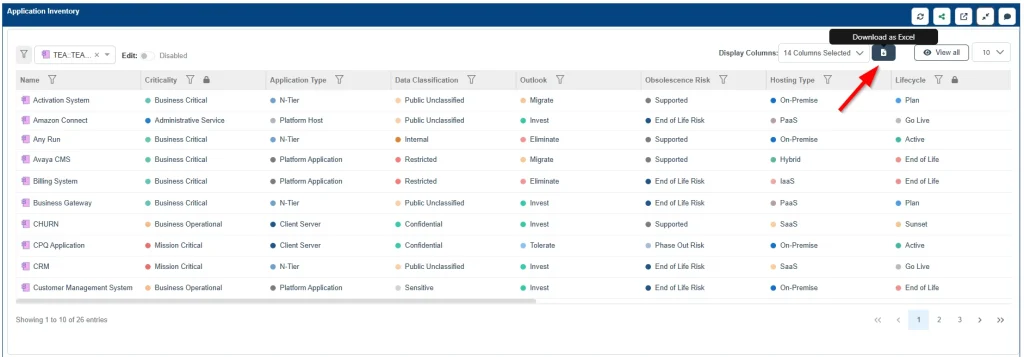
The key concept is that Prolaborate remains the source of truth for application portfolio reporting, while exports are simply different consumption methods for the same underlying model.
Keeping Dashboards in Sync with Sparx Enterprise Architect
Because Prolaborate sits directly on top of your Sparx EA APM repository, there is no manual refresh step for core data.
- When architects update applications, scores, or links in Sparx EA, those changes are instantly available in Prolaborate.
- When application owners update attributes via Prolaborate forms, those changes are written back to EA.
Best Practices for Data Hygiene
To maintain a clean portfolio, teams typically agree on:
- Ownership Boundaries: Define who maintains the metamodel/structure in EA versus who maintains data fields via Prolaborate.
- APM Cadence: Establish regular cycles, such as quarterly health updates and annual deep-dive reviews.
- Data Quality Routines: Use Prolaborate views to identify missing scores, unknown owners, or outdated statuses.
The result is a seamless loop where the Sparx Prolaborate APM dashboards reflect the current Sparx EA APM model, and the EA model reflects current portfolio information supplied by the experts who know it best.
Cut Months of Setup into Days—Start with Proven Sparx Application Portfolio Management Templates
Presenting APM assessments in Prolaborate transforms static data into a dynamic decision-making engine. By providing tailored Prolaborate APM reports and collaborative workflows, you empower stakeholders with real-time insights without the complexity of modeling tools. This seamless integration ensures your portfolio strategy remains transparent, accurate, and agile, driving faster rationalization decisions based on a single source of truth.


