
For most organizations, the problem isn’t a lack of applications, it’s a lack of clarity. You may have hundreds of systems, but no single, reliable view of what they do, who owns them, what they cost, and which ones should be retired or modernized first.
Sparx Systems Enterprise Architect (EA) and Prolaborate give you a practical way to move from scattered spreadsheets to a governed, analytics-ready application portfolio, setting the stage for effective application portfolio rationalization in Sparx EA. Instead of building yet another “APM tool”, you’re shaping a model that fits your architecture, governance, and data reality by exposing it to stakeholders through Prolaborate.
Cut Months of Setup into Days—Start with Proven Sparx Application Portfolio Management Templates
Step 1: Build the Application Inventory
The starting point for any application portfolio assessment is a clean, agreed-upon application inventory in Sparx EA.
n Sparx Enterprise Architect (EA), you define what counts as an application in your context (product, platform, business-facing system, or major module) and represent it using consistent element types such as ArchiMate Application Components or UML Components. These elements are organized into logical groupings like domains, business units, or regions inside EA packages.
On top of that, you attach a small set of standard attributes such as business owner, IT owner, lifecycle status, criticality, main technology, vendor, and high-level cost. In Sparx EA, this is usually done through tagged values or a lightweight APM MDG profile, so those attributes are reusable and governed.

Data rarely starts in Sparx EA. You typically pull initial lists from CMDBs, ITSM tools, license tools, or spreadsheets and import them into Enterprise Architect. Once the baseline is in place, you can stop managing the portfolio in Excel and start using Prolaborate as the controlled front door for updates.
The outcome: one model-based application inventory that everyone agrees is “the list”.
Step 2: Define APM Assessment and Scoring
Once your inventory is built, the next step is application portfolio assessment with the Sparx EA: how good or bad is it?
In Sparx EA, you extend the application elements with a set of assessment dimensions – for example, business value, technical health, risk/compliance, and cost profile. Each dimension has a simple scale (1–5, or High/Medium/Low) with clear definitions so different teams can conduct APM scoring in a consistent way.
Those scores can be stored directly on the application element (as tagged values) or captured in dedicated “Assessment” elements linked to the application if you want to keep assessment histories over time. Either way, the structure is model-driven and reusable across domains.

Prolaborate then becomes the channel to collect and validate those scores:
- Application Owners and SMEs get simple web forms to update the assessments for their applications.
- Architects and portfolio managers can see where data is missing, inconsistent, or out of date.
- Reviews can be launched around specific sets of applications to validate or adjust the scoring.
Instead of chasing people for spreadsheet updates, you’re guiding them through structured, role-based assessment sessions on top of a single EA repository.
Step 3: Model Rationalization Decisions (Retire / Rehost / Rebuild / Replace)
Assessment tells you which applications are healthy or problematic. Your portfolio rationalization strategy defines what you intend to do about them.
In Sparx Enterprise Architect, this is modeled as a compact decision layer around each application, typically with fields such as:
- Rationalization option (Retain, Retire, Rehost, Rebuild, Replace)
- Target role (Strategic platform, Tactical, Legacy)
- Target date or time horizon
- Link to successor or target solution
You also capture the reasoning behind these decisions using EA’s relationships and supporting elements:
- Links to the business capabilities and processes the application supports
- Links to projects, programs, or work packages that will deliver the change
- Links to risks, constraints, or technology standards that influence the decision
This is where using Sparx EA as an application rationalization tool shines. It turns “we plan to retire this app” from a line in a deck into a traceable model: you can see what it impacts, what replaces it, and which initiative will make it happen.

Prolaborate surfaces these decisions through filtered views (e.g., “All applications marked Retire in the next 3 years”) and review workflows, so portfolio boards and domain owners can validate, challenge, and eventually approve the rationalization plan.
Step 4: Present APM Findings through Prolaborate
The Model repository, now holds the deep structure for your application portfolio analysis with Sparx EA; Prolaborate makes that structure usable for non-modelers.
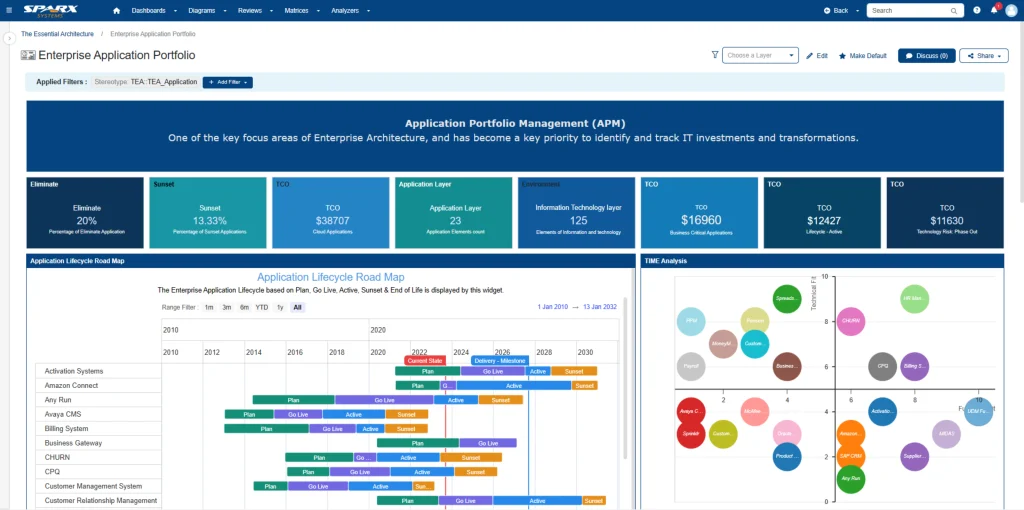
You can design role-based landing pages in Prolaborate:
- For CIOs and IT leaders: high-level counts, trends, and risk/health heatmaps.
- For domain/portfolio architects: domain-filtered inventories, capability-to-application mappings, and lists of rationalization candidates.
- For application owners: a focused list of “my applications,” with assessment status and review tasks.
These views use Prolaborate’s tables, charts, and widgets, all driven from EA’s underlying data. Users can filter by domain, lifecycle, technology, rationalization option, or score, without needing to know anything about EA models.
Prolaborate reviews close the loop. Instead of circulating slides and spreadsheets, you launch a review on a specific subset of applications, for example, all high-risk, high-value apps in a domain and collect comments, approvals, and decisions directly against the model elements. That review history stays attached to the portfolio, not buried in email threads.
Step 5: Move from Inventory to Analytics
Once the basic model and dashboards are in place, you can move from simple inventory reporting to analytics-driven portfolio management.
This level of application analysis with Sparx Enterprise Architect and Prolaborate allows you to answer some of the most essential questions:
- How many applications are supporting each capability or process?
- Where do we have clusters of low-technical-health, high-business-value applications?
- Which platforms and vendors dominate our landscape, and where are we exposed to end-of-support risk?
- What does the planned rationalization picture look like by domain, region, or time horizon?
Over time, many organizations go a step further and combine EA data with external metrics:
- Cost data from finance or ITSM systems
- Incident and stability data from ITSM tools
- Risk and audit findings from GRC platforms
Our Experts can help jumpstart your APM with well-defined decision-grade metrics, aligned governance and role-based dashboards.
Enterprise Architect remains the structural “map” of your portfolio; these other sources bring in volume and performance metrics. Prolaborate can expose those linkages or summaries so stakeholders see both structure and signals in one place.
The key is to establish a lightweight but regular operating rhythm: periodic assessment refreshes, monthly or quarterly portfolio reviews, and annual rationalization updates tied to budgeting. EA supports the design and evolution of your application portfolio rationalization strategy; Prolaborate supports the conversations and decisions that make it a reality.


