
Your application portfolio is one of your most powerful data sets, but only if you can harness it. If your inventory is trapped in static spreadsheets or an untrusted CMDB, you’re stuck maintaining data instead of driving change. The first step to building dynamic, actionable roadmaps is transforming that inventory into a living, strategic asset.
Sparx Systems Enterprise Architect (EA) provides the flexibility to do this right. It allows you to move beyond rigid data models and define what “application” means for your business. By modeling your inventory in Sparx EA, you create a trusted, versioned source of truth that is always ready to be enriched, analyzed, and shared via Prolaborate as a dynamic application catalog.
Hands-on training covering model setup, portfolio attributes, and dashboard configuration for Application Portfolio Management (APM) use cases.
What to Capture in an Application Inventory (minimum data set)
Your goal is not to capture everything but to capture just enough application metadata to support decisions.
For each application in Sparx EA, you typically want a small, standard set of data:
- Identity – Name, short code/ID, brief description, primary business area
- Ownership – Business owner, IT owner, or support team, vendor vs in-house
- Lifecycle – Proposed/Active/Sunset/Retired, business criticality
- Technology – Main platform or stack, hosting type (on-prem, cloud, SaaS)
- Cost/usage – Simple indicators like annual run cost band, internal vs external users
In Enterprise Architect, this application metadata usually sits as tagged values on a chosen “Application” element type (for example, an ArchiMate Application Component with your own stereotype). That makes it easy to standardize, validate, and surface through Prolaborate later.
Recommended Sparx EA Tagged Values for APM
As a starting point, you can define a compact tagged value set, such as:
- Application Type
- Lifecycle Status (Proposed, Active, Sunset, Retired)
- Business Criticality (High, Medium, Low)
- HostingType (OnPrem, PrivateCloud, PublicCloud, SaaS)
- Data Classification
- Total Cost of Ownership (approximate)
- Outlook (Tolerate, Invest, Migrate, Eliminate)

You can refine this later, but keeping the initial list short makes it much easier to get real data populated from application owners. As your practice matures, these data points become essential for designing APM scoring models based on value and risk.
Modeling Applications vs Systems vs Services
In Sparx Enterprise Architect, it helps to make a clear distinction between a few key concepts so your inventory doesn’t become a generic “systems” list:
- Applications – What the business recognizes as systems they use (e.g., CRM, HR Portal, Claims Engine).
- Systems / platforms – Underlying technology platforms that those applications run on (e.g., SAP, Salesforce, Oracle DB).
- Services – Capabilities or APIs that those applications expose (e.g., Customer Search API, Payment Authorization Service).
For the inventory itself, you normally:
- Treat applications as the primary APM object (with your APM stereotype and tagged values).
- Keep systems/platforms and services available in the metamodel so you can model them as you move into integrations and technical architecture.
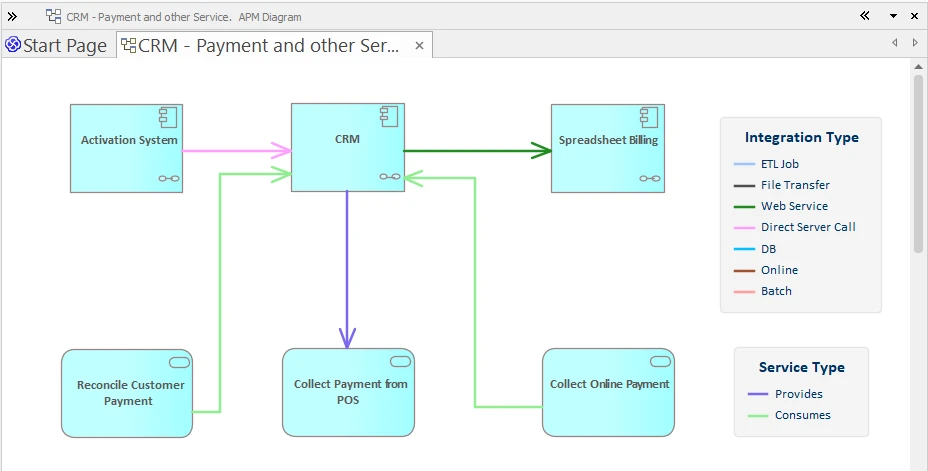
The main idea: everyone understands what counts as an “application” in the model, and you’re not forced to overload that concept with platform and service details.
Organizing Your Sparx EA Repository Structure for Applications
A good inventory isn’t just the elements; it’s also how you structure them in the repository. This EA repository structure is key for scalability.
In Sparx EA, that usually means:
- Packages – Group applications in a way that matches how your organization thinks: by domain, business unit, or region.
- Stereotypes – Define a clear «Application» stereotype (or equivalent) for your chosen element type and use it consistently.
- MDG – If APM is strategic, wrap your stereotypes, tagged values, and relationships in a small MDG so you can reuse them across repositories and projects.

This doesn’t have to be complex on day one. Even a simple structure, one top-level “Application Portfolio” package, sub-packages per domain, and a single «Application» stereotype gives you enough order to scale.
Linking Apps to Business Capabilities and Processes
An inventory becomes useful when you can answer questions like:
- “Which applications support this capability?”
- “Which processes break if we retire this system?”
With the in-depth modeling and traceability features of Sparx EA, you can answer the key application portfolio questions by:
- Modeling Business Capabilities and Business Processes in their own packages.
- Linking applications to the capabilities they enable and the processes that use them, using a small set of standard relationships (e.g., “realizes,” “serves,” or associations, depending on your notation).
You don’t need full coverage from day one. Start with:
- A prioritized list of capabilities and key processes.
- Link the main applications to those.
Over time, those relationships become the backbone for APM impact analysis and rationalization decisions.

Publishing the Inventory in Prolaborate
Once the application inventory in Sparx EA is modeled, Prolaborate turns it into a web-based portfolio view that non-modelers can work with.
At a simple level, you can:
- Create tabular views that act as a dynamic Sparx EA application list, showing all «Application» elements with key fields (owner, lifecycle, domain, rationalization option).
- Build filtered APM views for each domain or business unit, so stakeholders see “their” slice of the inventory.
- Configure forms so application owners can update tagged values (like criticality, lifecycle, and hosting type) directly through Prolaborate, without using the EA client.
- Add basic Sparx APM dashboards and charts (e.g., applications per domain, by lifecycle, by hosting type) for leadership dashboards.
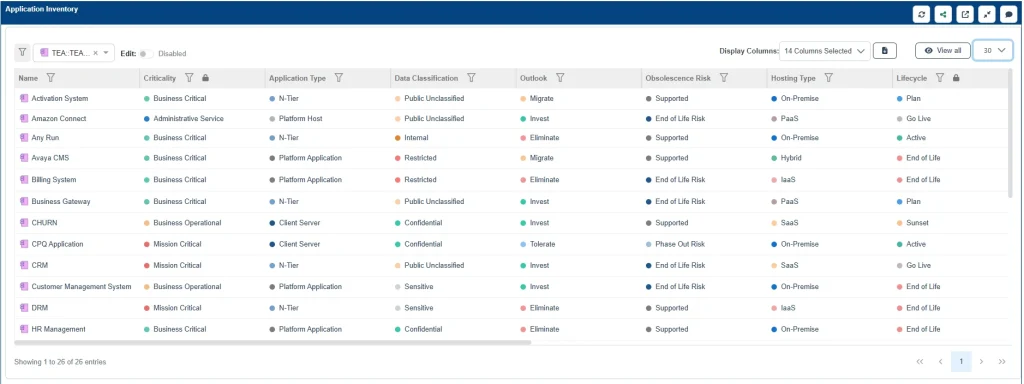
Enterprise Architect (Sparx EA) remains your design and modeling tool; Prolaborate becomes the front door where portfolio stakeholders view, update, and review the inventory on an ongoing basis.
Cut Months of Setup into Days—Start with Proven Sparx Application Portfolio Management Templates
Building your application inventory in Sparx EA is the foundational step for mature Application Portfolio Management. By moving away from static spreadsheets and disconnected data, you create a single source of truth. This trusted modeled inventory, enriched with metadata and connected to your business capabilities, allows you to make strategic decisions, manage technical debt, and clearly communicate your application landscape to all stakeholders. The combination of Enterprise Architect for modeling and Prolaborate for accessibility transforms your inventory from a simple list into a dynamic, valuable asset for the entire organization.
Related Articles
- How to Import Your Application Inventory from APM Accelerator Excel into the Sparx Enterprise Architect Model
- How to Get Started with the Application Portfolio Management (APM) Accelerator in Enterprise Architect 17
- How to Turn Your Sparx EA APM Model into Integration Diagrams and Prolaborate Dashboards


