
When organizations first try to get a grip on their application landscape, they usually start in Excel and slide decks. It works for a while, but it quickly becomes hard to answer basic questions:
- How many applications do we actually have?
- Which business areas do they support?
- Who owns them and what are we planning to do with them?
The Sparx Systems Application Portfolio Management (APM) Accelerator is designed to shortcut that struggle. Instead of you having to design a metamodel, custom MDG, project structure, and dashboards from scratch, it gives you a ready-made APM setup on top of Sparx Enterprise Architect.
This guide walks you through what the APM Accelerator contains and how it is structured in your Sparx EA repository. By the end, you’ll have a clear picture of the core concepts, building blocks and catalog structure that the later how‑to articles build on.
Ready to try this in your own repository?
Download the Sparx Systems APM Accelerator to get the metamodel, MDG, example model, Excel template and dashboards all-in-one package.
Why Use the Sparx APM Accelerator in Enterprise Architect?
If you are already using Enterprise Architect, you could certainly build your own APM approach from the ground up. But that typically means:
- Defining your own APM metamodel
- Creating stereotypes and MDG profiles
- Designing a package structure that will scale
- Figuring out how to move data from Excel into Sparx EA
- Later, designing dashboards and reports in Prolaborate

The APM Accelerator gives you a starting point that is already thought through and field-tested. It focuses on the information you need to run an application portfolio and to answer the kinds of questions CIOs, architects, and business owners actually ask.
Roles that benefit immediately include:
- Enterprise Architects – who want a governed, reusable model of the application landscape
- Portfolio Managers – who need a single source of truth rather than multiple spreadsheets
- Solution / Domain Architects – who want to understand dependencies, integrations, and ownership
Instead of spending months designing “how” to model APM, you can spend your time on “what” the portfolio looks like and “why” certain decisions should be taken.
What’s Included in the APM Accelerator Pack?
At a high level, the Accelerator gives you three major building blocks:
- The modeling foundation – metamodel, MDG profile, customized toolbox, and model patterns
- The data loading assets – Excel template and import profiles (covered in detail in our APM Excel import guide for Sparx EA)
- The visualization assets – a pre-populated model, model add-in and Prolaborate dashboards (covered in generating integration views and dashboards for Sparx APM)
Overview of the Assets
In practical terms, you get:
- APM Metamodel and reference model – defines the objects and relationships used for APM
- APM MDG Profile & customized toolbox – a tailored set of stereotypes and connectors that enforce the APM metamodel
- Model Patterns for APM – predefined Business, Application, and Governance layer package structures
- Excel template & import profiles – to bring application data from spreadsheets into EA in a governed way
- Model Harvest (APM model) – an example EA project that shows a populated portfolio based on the metamodel
- APM Model Add-in – a helper that generates integration diagrams from your model
- Prolaborate APM dashboards – preconfigured dashboards for portfolio stakeholders
How These Pieces Work Together
You can think of it like this:
- Metamodel + MDG + Patterns give you the structure and guardrails
- Excel template + import profiles give you a repeatable way to load and maintain data
- Model add-in + dashboards turn that model into diagrams and insights
This guide focuses on the first part: getting the structure and guardrails in place in your EA repository.
Understanding the APM Metamodel
At the core of the Accelerator is an application-centric metamodel. Rather than modeling everything in the enterprise, it focuses on the information that matters for portfolio decisions.
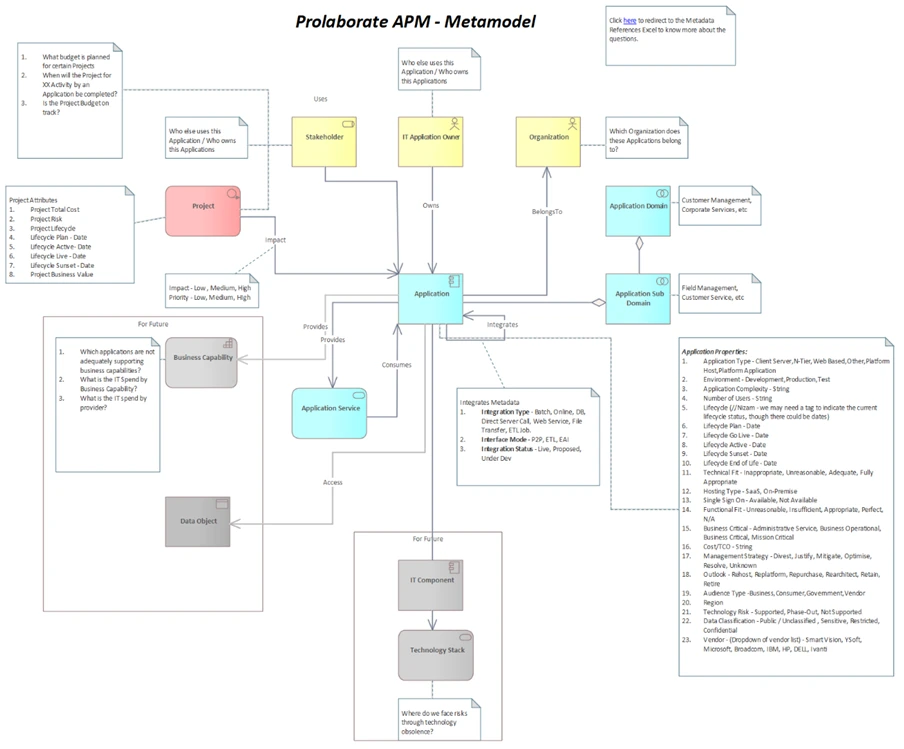
Application-Centric View of the Portfolio
In the APM metamodel, Applications are the primary building blocks. Around them, you capture the context you need to understand value, risk, cost, and change impact. This gives you a consistent, repeatable way to answer questions such as:
- Which applications support a given business domain or capability?
- Who owns each application and who are the key stakeholders?
- Which projects are touching which applications?
- How are applications integrated with each other?
Because the metamodel is explicit, everybody is modeling in the same way. That reduces ambiguity and makes reporting much easier.
Key APM Elements
The Accelerator focuses on a small, well-defined set of elements: Applications and Application Services, Domains and Sub-Domains, Organizations and Stakeholders, IT Application Owners, and Projects or initiatives. You can extend this catalog if needed, but starting from these shared building blocks helps teams align quickly and keeps the portfolio model easier to govern.
Standardized Relationships for Clear Impact
The metamodel also standardizes how these elements relate: applications link to domains, services, organizations, owners, projects and to other applications for integrations. Using the APM MDG’s predefined connectors means every architect captures dependencies in the same way, which in turn enables reliable integration diagrams, impact analysis and portfolio dashboards.
What’s in the APM Excel Template?
Because the Accelerator is designed to work smoothly with existing spreadsheets, the APM Excel template mirrors the same catalogs you see in the model. At a high level, the spreadsheet contains:
| S.no | Sheet Name | Contents | Import Profile |
|---|---|---|---|
| 1 | Organizations | List of organizations or business units that own or use apps | TEA-Organization |
| 2 | Stakeholders | Key stakeholders and roles linked to applications and domains | TEA-Stakeholder |
| 3 | IT Application Owners | Named application or service owners / custodians | TEA-ITApplicationOwner |
| 4 | Domains | Top-level functional domains used to group applications | TEA-Domain |
| 5 | Sub Domains | More granular groupings under each Domain | TEA-SubDomain |
| 6 | Application Inventory | One row per application with IDs, names and key attributes | TEA-Application |
| 7 | Application Services | Services exposed or consumed by applications | TEA-ApplicationService |
| 8 | Application Integrations | Source/target applications with basic integration details | TEA-ApplicationIntegration |
| 9 | Projects | Projects and changes that impact specific applications | TEA-Project |
The APM MDG Profile and Customized Toolset
To enforce the metamodel and make modeling easier, the Accelerator provides a dedicated APM MDG Profile for Enterprise Architect.
Why an MDG Profile for APM?
In Sparx EA, an MDG Profile lets you define stereotypes, tagged values, and connector rules and package them as a technology. The APM MDG Profile does exactly that for your application portfolio.
It helps you:
- Restrict modeling to the APM metamodel, avoiding random element types and connections
- Standardize stereotypes so applications, services, domains, and stakeholders are modeled consistently
- Apply governance rules so that important fields and relationships are not overlooked
The result is that every architect who opens EA sees the same APM-specific structures and behaves within the same guardrails.
APM Toolbox: Only the Elements You Actually Need
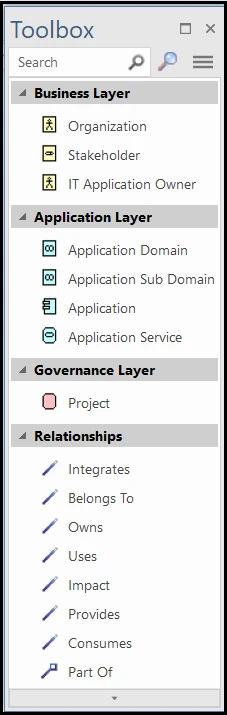
Along with the MDG, you get a customized APM toolbox. Instead of presenting the full EA APM toolbox with hundreds of options, the APM toolbox focuses only on the elements and connectors relevant for APM.
When you work with the APM toolbox, you will see, for example:
- Application and Application Service elements
- Domain and Sub-Domain elements
- Organization, Stakeholder, and IT Owner elements
- Connectors that reflect the APM metamodel (such as “is owned by”, “supports”, “is integrated with”)
This reduces mistakes and speeds up modeling because your team is guided towards the correct modeling choices.
APM Model Patterns: Ready-Made Catalogs for Your Portfolio
Where the MDG Profile governs how you model, the Model Patterns give you a head start on where to store different kinds of APM information. The Accelerator ships with a predefined layered catalog structure (Business, Application and Governance) so you get a sensible package hierarchy out of the box, without having to design folders and sub-packages from scratch.
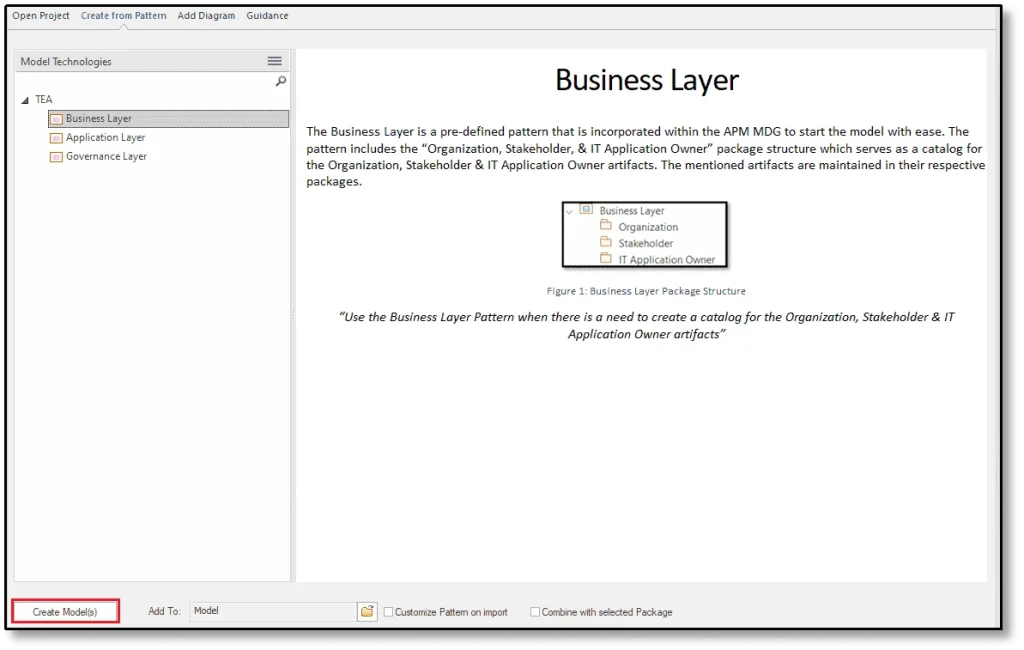
Why Start with Patterns Instead of Blank Packages?
In theory, you could always create your own packages from scratch. In practice, starting with the provided model patterns gives you:
- A consistent structure across repositories and teams
- A layout that aligns with the Excel import and Prolaborate dashboards
- Less debate about “where should this go?” when you start modeling
It also makes it much easier to follow the step-by-step guides for importing data and generating diagrams later.
How the APM Accelerator Fits into Your EA Setup
At a practical level, using the Accelerator in your own environment usually involves three moves:
- Turn on the APM MDG technology so Enterprise Architect exposes the APM-specific stereotypes, tagged values and toolbox.
- Create the standard catalog structure using the APM model patterns, giving you Business, Application and Governance layers with sensible sub-packages.
- Load data and views on top of that structure – typically by importing from the APM Excel template and, later, by generating diagrams and dashboards.
This guide has focused on understanding those building blocks conceptually. The “how‑to” steps including which menus to use, which files to pick and in what order are covered in the next articles.
Our Experts can help jumpstart your APM with well-defined decision-grade metrics, aligned governance and role-based dashboards.
What’s Next: Moving from Concepts to a Working APM Repository
In the next step of your APM journey, we’ll move from concepts to a working repository.
Our APM Excel import guide for Sparx EA will show you how to:
- Enable the APM MDG and model patterns in a real EA project.
- Pull in existing application inventories and related information from spreadsheets using the APM Excel template and import profiles.
- Create elements and relationships in EA that conform to the APM metamodel.
Once that’s in place, let’s focus on turning the model into integration diagrams and prebuilt Prolaborate dashboards that support real APM analysis and decision-making.
If you are working with Enterprise Architect 17, you can also follow our EA 17 APM accelerator setup guide to turn on the built-in APM accelerator and load the APM Example Model.


