
When you’re mapping behavior in a use case diagram, the fastest boost to clarity is choosing the right relationship between use cases. The UML Use Case relationship <<include>> and <<extend>> remain a point of confusion for many modelers, architects and business analysts. Teams often swap them—making diagrams ambiguous, scenarios inconsistent, and test coverage shaky.
In this practical guide to Sparx UML modeling, we’ll define include and extend in Enterprise Architect UML, call out the difference that matters in reviews, and show how to model them cleanly on a EA UML diagram.
What is «include» in Sparx UML Modeling?
«Include» is a UML use case relationship that inserts the behavior of one use case into another. In Sparx Enterprise Architect (EA), you use it to reuse mandatory steps across flows, for example, Authenticate User or Validate Payment so teams avoid duplicating logic and keep Enterprise Architect UML modeling consistent and maintainable overall.
Think of include as extracting a common subroutine: the base use case depends on the included use case to be complete. In EA UML, draw an «include» connector from the base to the reusable use case, then document the shared steps in scenarios. Use it when two or more use cases share identical, mandatory behavior such as login, fraud checks, calculation routines. Because the included use case always runs, avoid stuffing optional alternatives here. Enterprise Architect’s model validation helps catch direction mistakes and missing semantics, and Prolaborate lets reviewers confirm the reuse intent quickly.
Ready to Standardize your Enterprise Architect UML Modeling?
Get Enterprise Architect licenses (Pro/Corp/Unified) with priority support and fast delivery—so your team can model include/extend correctly from day one.
What is «extend» in Sparx UML Models?

«Extend» is a UML use case relationship that adds optional or conditional behavior to a base use case at defined extension points. In Enterprise Architect UML, an extending use case augments the base only when a guard condition holds—think Apply Coupon during Checkout, keeping the base use case meaningful and independent.
In EA UML, draw the «extend» connector from the extending use case to the extended one, then select an extension point on the target use case. Name use case extension points clearly (for example, “Promotions”, “On failure”), and describe the trigger in scenarios with guards. Use extend for optional flows, cross-cutting enhancements, or rare exceptions that should not clutter the base narrative. Enterprise Architect’s context menu lets you show or hide the extension point note; model validation and team reviews in Sparx Systems Prolaborate keep direction and conditions correct.
Include vs Extend: The Difference (with Extension Points) in Sparx UML Diagrams
Use this simplified side‑by‑side comparison to clear up the most common issues teams hit during Sparx UML modeling in Enterprise Architect UML.
| Aspect | «include» | «extend» |
|---|---|---|
| Purpose | Reuse mandatory behavior across multiple use cases. | Add optional/conditional behavior to a base use case. |
| Completeness of base | Base needs the included use case to be complete. | Base remains meaningful on its own without the extension. |
| When it runs | Always runs when the base runs. | Runs only if a guard/condition is true. |
| Extension points | Not used. | Required: target base defines named use case extension points. |
| Connector direction | From base → included use case, labeled «include». | From extension → base, labeled «extend». |
| Scenario writing | Put the shared steps in the included use case; reference from the base. | Put the optional steps in the extending use case; document the guard and chosen extension point. |
| Actor links | Actors usually connect to the base (included often has no direct actor). | Actors still connect to the base; extension rarely has a direct actor. |
| Typical examples | Authenticate User, Validate Payment, Verify Balance. | Apply Coupon, Print Receipt, Send 2FA Code on Risk Trigger. |
When to Use Which: EA UML Diagram Examples & Decision Rules

Example context (from the diagram): Manage Users in an Online Book Store with actors Client and Administrator.
Where «include» fits in this model
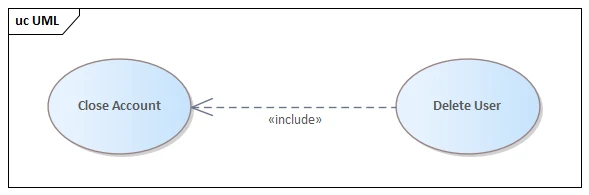
- Close Account «include» Delete User.
- Why it’s «include»: closing an account is not complete unless the user record is removed/archived. The base depends on the included behavior, so this is mandatory reuse.
- Notes on actors: the included use case (Delete User) has an Administrator actor. That’s acceptable because the deletion is a direct admin action; the Client still connects to Close Account.
- EA cue (Sparx UML diagram): dashed «include» from Close Account → Delete User; document the shared steps in the Delete User scenario. Use Model Validation to confirm connector direction.
Where «extend» fits in this model
- View Account Details is extended by View History and View Open Orders.
- Why it’s «extend»: these are optional/conditional drill‑downs. The base use case remains meaningful on its own; the extensions run only when the user selects those options.
- Extension points to name in EA: History panel, Open orders link. Add brief guard text such as “when user selects ‘View History’”.
- EA cue (EA UML): dashed «extend» from View History → View Account Details and from View Open Orders → View Account Details; pick the named Extension Point on the base.
Quick decision rules (apply in your Sparx UML modeling)
- Must it always run? Yes → «include». No/conditional → «extend».
- Is it shared by multiple bases? Yes → «include» (reuse); No → consider «extend» for variant behavior.
- Does the base still make sense alone? No → you likely need «include». Yes → «extend» is appropriate.
- Is the variation triggered by a user choice or guard? Yes → «extend» with a named extension point.
- Are you splitting the flow only for layout? Don’t. Keep it in the base scenario; use «include» only for real reuse.
- Do actors connect to the extension/included use case? Usually no—keep actors on the base. Add a direct link only when the interaction is direct (like the Administrator for Delete User).
- Are relationships getting deep (A includes B includes C …)? Refactor. Prefer one level for readability and simpler use case relationships.
Need expert help with Sparx EA?
Get a focused review of your use case models, validation rules, and review workflows with hands-on guidance tailored to your context.
FAQs on Include/Extend in Sparx UML
What is the difference between include and extend use case in UML?
«include» extracts mandatory, reusable behavior into its own use case; the base depends on it to be complete and it always executes. «extend» adds optional or conditional behavior at named extension points; the base stands alone, and the extension executes only when its guard condition holds, therefore, typically in practice.
Is «include» the same as inheritance (generalization) in Sparx UML modeling?
No. «include» is not inheritance. It composes behavior by factoring mandatory steps into a reusable use case. Inheritance (generalization) specializes a use case’s meaning, forming an is-a relationship between parent and child. Use generalization for specialization; use «include» for shared mandatory behavior; use «extend» for optional variation. These are different.
Can multiple base use cases «include» the same reusable use case across packages or projects?
Yes. Multiple base use cases may «include» the same reusable use case, even across packages or projects, provided the semantics remain identical. Centralizing mandatory steps improves consistency, governance, and testing. Keep names stable, document preconditions and postconditions, and avoid coupling shared includes to specific actors, UI screens, or technologies, safely.
When is it better to refactor a large base into smaller includes vs keeping one narrative?
Refactor when the base repeats the same mandatory steps in several places, grows unreadable, or complicates testing and change control. Extract those shared steps into a single included use case with clear inputs, outputs, and preconditions. Keep narrative intact when behavior is unique, sequential, and easily understood within one flow.
What are the most common mistakes teams make with «include» and «extend» in Sparx UML diagrams?
Common mistakes: reversing connector directions; omitting or misnaming extension points; using «extend» for mandatory behavior; using «include» for optional variations; wiring actors to included or extension use cases incorrectly; fragmenting flows into tiny includes; skipping guard conditions in scenarios; and splitting flows for layout rather than meaning or reuse, altogether.


